# Build a poor man’s data lake from scratch with DuckDB
> Use DuckDB, Python, and Dagster to build a lightweight data lake with SQL transforms and Parquet file support.
Source: https://dagster.io/blog/duckdb-data-lake
Published: 2022-10-25

What does Zoolander have to do with Data Engineering? Probably less than you might think.
DuckDB is so hot right now. It could be for a few reasons:
- It is feature-rich, matching many common data warehouses in its feature set
- [It’s fast](https://www.dataduel.co/revisiting-data-query-speed-with-duckdb/)
- It can run locally, so your tests can use the same engine as production
- It plays really nice with Python, including [deep Pandas integration](https://duckdb.org/2021/05/14/sql-on-pandas.html)
- It can access remote data sets efficiently
- It’s MIT licensed
But I think there’s a different reason underlying the hype around DuckDB.
We all have this feeling that the current explosion of data tools has made things harder and overly complex. DuckDB is a breath of fresh air; a powerful, feature-rich SQL engine that’s fast enough and runs anywhere you need it - no SaaS required.
What would it take to replace our cloud data warehouses or data lakes with DuckDB?
## Table of contents:
📏 The limitations of DuckDB\
🏃️ Before we get started…\
🔨 What we’ll build\
🛫 Getting started\
🌊 The core abstraction\
🧪 Writing a test\
🪚 Implementing the core DuckDB class\
🧵 Converting SQL objects to strings\
🖼️ Collecting data frames\
🔌 Implementing the IOManager\
🪛 Wiring up our project\
🗑️ More realistic data pipelines\
🧬 Future work
[Video: Embedded article media](https://cdn.embedly.com/widgets/media.html?src=https%3A%2F%2Fwww.loom.com%2Fembed%2F8d5afcb694ae4dd881fac057b81cb758\&display_name=Loom\&url=https%3A%2F%2Fwww.loom.com%2Fembed%2F8d5afcb694ae4dd881fac057b81cb758\&image=https%3A%2F%2Fcdn.loom.com%2Fsessions%2Fthumbnails%2F8d5afcb694ae4dd881fac057b81cb758-1666672890559.gif\&type=text%2Fhtml\&schema=loom)
Let Pete Hunt walk you through building a local data lake from scratch with DuckDB
## 📏 The limitations of DuckDB
So should we rip out our Snowflake, BigQuery, and Databricks setups and replace them with DuckDB?
Not so fast. Despite what Data Twitter™ may tell you, DuckDB does have its limits. One big one is that it’s designed for use on a single machine. If your data doesn’t fit on a single machine, you’re hosed. Fortunately, computers are pretty fast these days, especially when you look at the [top offerings on AWS](https://aws.amazon.com/ec2/instance-types/x1/), so many organizations don’t have data big enough to require multiple machines.
The second is that DuckDB is fundamentally a single-player experience. It operates on a single file on disk, and it’s very hard for multiple data scientists, engineers, or teams to share the data, ensure that it’s up-to-date, and run multiple concurrent processes.
However, when DuckDB is combined with a small number of other technologies - such as Dagster, S3, and Parquet - it can become a powerful, multiplayer data lake that can serve the needs of many organizations with very little effort.
#### 🏃️ Before we get started…
Warning: This is all experimental!
DuckDB is a rapidly evolving technology, and the practices in this blog post aren’t widely adopted in industry. Do your own research before implementing any of this stuff, and consider this blog post simply a bunch of crazy ideas. However, I’d imagine that something like this could be productionized fairly quickly and could be the future of data engineering for some class of businesses where it makes sense.
#### 🔨 What we’ll build
We’re going to build a version of [dbt’s Jaffle Shop example](https://github.com/dbt-labs/jaffle_shop) using the following tools:
- [Dagster](https://dagster.io/) for orchestration
- [DuckDB](https://duckdb.org/) for SQL transformations
- [Parquet](https://parquet.apache.org/) files on S3 for storage
Most For the purposes of this blog post we’ll call it `DuckPond`.
> 💡 Want to skip right to the code? [It’s on GitHub](https://github.com/petehunt/dagster-poor-mans-data-lake).
#### 🛫 Getting started
First, as always, we’ll scaffold a new project. Go to to get a fresh Python environment to play around with if you don’t want to set one up locally.
Next, run `pip` `install` `dagster` `&& dagster project scaffold` --`name=jaffle`. At this point you should have a simple “hello world” example on disk. Let’s `cd` `jaffle` and add the following dependencies to `setup.py`:
- `pandas` - so we can manipulate data in Python
- `duckdb` - so we can use
- `` `sqlescapy` - so we can `` [`interpolate values`](https://dagster.io/glossary/data-interpolation) `into SQL safely`
- `` `lxml` and `html5lib` - so we can `` [`scrape`](https://dagster.io/glossary/data-scraping) `tables from Wikipedia for our first example`
And these to our extra `dev` dependencies:
- `localstack` - our local S3 service
- `awscli` - the AWS CLI tools
- `awscli-local` - the localstack wrapper for `awscli`
Run `pip install -e '.[dev]'` to install these dependencies.
Once installed, we’ll spin up a local development version of our data lake. Run `localstack start` to bring up a local development version of S3, and then create a bucket called `datalake` by running `awslocal s3 mb s3://datalake`.
localstack runs a local suite of common AWS services including S3. By default, it uses port `4566`, and has `test` as both the access key ID and secret.
#### 🌊 The core abstraction
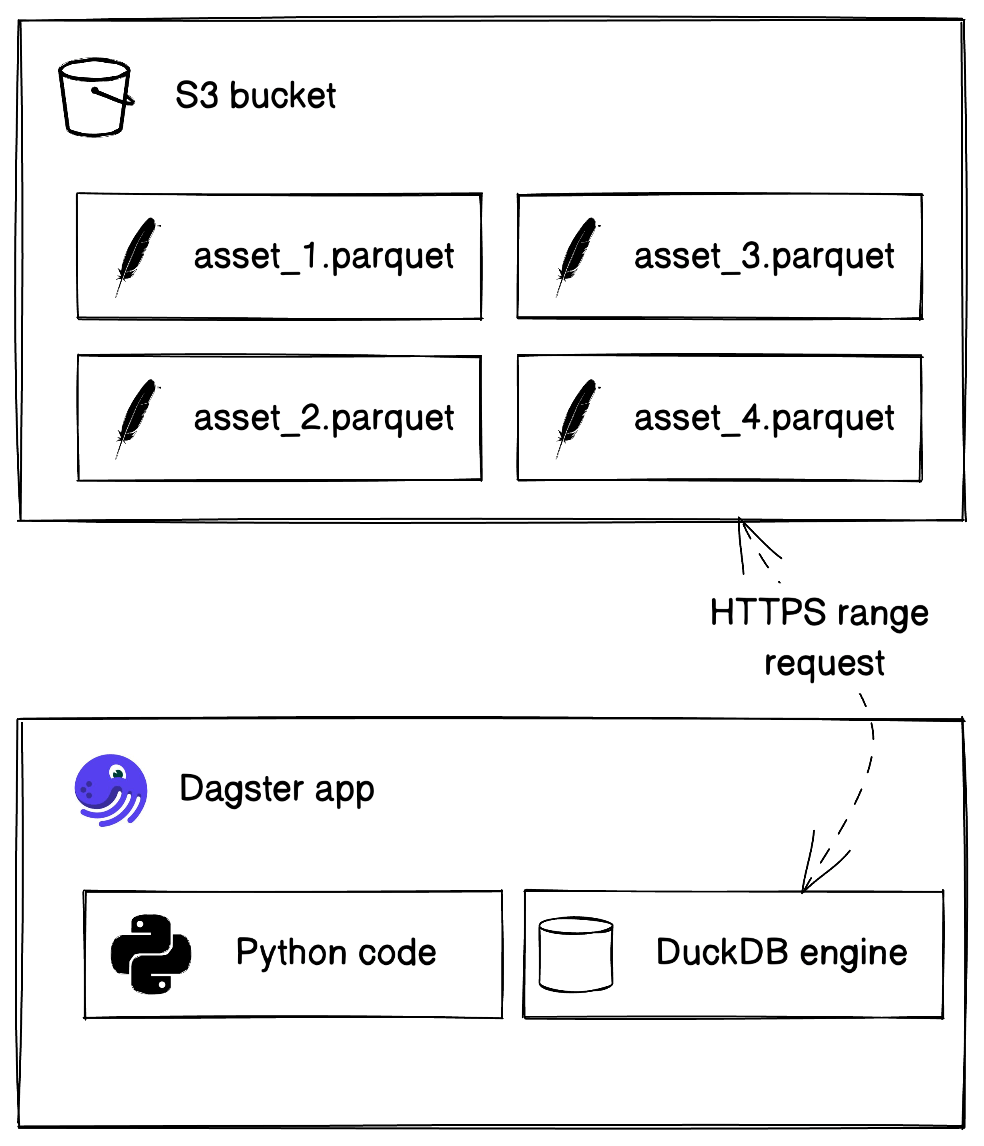
Our data lake is going to be a set of Parquet files on S3. This combination is supported natively by DuckDB, and is also ubiquitous, open (Parquet is [open-source](https://parquet.apache.org/), and S3 is now a generic API implemented by a number of [open-source](https://min.io/) and [proprietary](https://www.digitalocean.com/products/spaces) systems), and fairly efficient, supporting features such as [compression](https://github.com/apache/parquet-format/blob/master/Compression.md), [predicate pushdown](https://duckdb.org/2021/06/25/querying-parquet.html), and `HTTP RANGE` reads to scan only the parts of the file that you need to.
> 💡 There’s a [great presentation on the Parquet format](https://www.youtube.com/watch?v=1j8SdS7s_NY) from the folks behind Spark if you want to learn the gory details.
Every table in our data warehouse will be represented by a Parquet file in S3, and every single Parquet file in S3 will be backed by a Dagster [Software-Defined Asset](https://dagster.io/blog/software-defined-assets). One of the advantages of DuckDB is how easy it is to interleave Python and SQL code, so we’ll need a way to easily construct SQL strings from Python and pass Python values into the SQL string.
So let’s start by modeling this as a Python class. Open up `jaffle/duckpond.py` and add:
```python
class SQL:
def __init__(self, sql, **bindings):
self.sql = sql
self.bindings = bindings
```
This is the primary class we’ll be using to pass DuckDB data between assets. It has two fields:
- `sql` - a SELECT query, which may include placeholders of the form `$name`.
- `bindings` - a mapping of names to values to be interpolated into the SQL query. This should support basic Python types like `str` and `int`, Pandas `DataFrame`s, and other instances of `SQL`.
With this tiny abstraction in place, let’s write a very basic example of how it may be used. Open up `jaffle/assets/__init__.py`:
```python
from dagster import asset
from jaffle.duckpond import SQL
import pandas as pd
@asset
def population() -> SQL:
df = pd.read_html(
"https://en.wikipedia.org/wiki/List_of_countries_by_population_(United_Nations)"
)[0]
df.columns = [
"country",
"continent",
"subregion",
"population_2018",
"population_2019",
"pop_change",
]
df["pop_change"] = [
float(str(row).rstrip("%").replace("\u2212", "-")) for row in df["pop_change"]
]
return SQL("select * from $df", df=df)
@asset
def continent_population(population: SQL) -> SQL:
return SQL(
"select continent, avg(pop_change) as avg_pop_change from $population group by 1 order by 2 desc",
population=population,
)
```
As you can see, the `SQL` abstraction allows us to easily compose together SQL and Python code (thanks to the power of Pandas, DuckDB and the lingua franca, Parquet). `population()` uses Pandas to scrape Wikipedia data and store it in a `DataFrame`, queries it via DuckDB and stores the results as a new Parquet file on S3. `continent_population()` reads the stored data with DuckDB and creates a new transformed Parquet file and stores it on S3.
#### 🧪 Writing a test
Before we start the implementation, let’s open up `jaffle_tests/test_assets.py` and add a test case:
```python theme=classic
from jaffle.assets import population, continent_population
from jaffle.duckpond import DuckDB
def test_assets():
p = population()
c = continent_population(p)
assert (
c.sql
== "select continent, avg(pop_change) as avg_pop_change from $population group by 1 order by 2 desc"
)
assert "population" in c.bindings
df = DuckDB().query(c)
top = df.loc[0]
assert top["continent"] == "Africa"
assert round(top["avg_pop_change"]) == 2
```
This test isn’t [best practice](https://docs.dagster.io/deployment/dagster-plus/deploying-code/branch-deployments/testing-against-prod-data) - it hits the network to download the dataset - but is a neat end-to-end test of the system for the purposes of this example.
You’ll notice that the `DuckDB` object hasn’t been implemented yet; let’s do that first so we can get our test passing!
#### 🪚 Implementing the core `DuckDB` class
Our test above references a class called `DuckDB` and uses it to query our `SQL` objects returned by our software-defined assets. This class is a small wrapper around DuckDB that turns `SQL` instances into strings that DuckDB can query. Additionally, it [magically registers the referenced DataFrames](https://duckdb.org/2021/05/14/sql-on-pandas.html) so they can be efficiently queried.
Let’s implement it step-by-step, starting with the core class in `jaffle/duckpond.py`.
```python
from duckdb import connect
class DuckDB:
def __init__(self, options=""):
self.options = options
def query(self, select_statement: SQL):
db = connect(":memory:")
db.query("install httpfs; load httpfs;")
db.query(self.options)
dataframes = collect_dataframes(select_statement)
for key, value in dataframes.items():
db.register(key, value)
result = db.query(sql_to_string(select_statement))
if result is None:
return
return result.df()
```
The `DuckDB` class takes an `options` string, which allows users to pass custom parameters to DuckDB (like S3 credentials).
The `query()` method does a few different things:
- It creates an ephemeral DuckDB database
- It installs and loads the `httpfs` extension, which adds HTTP and S3 support to DuckDB, along with any other user provided options
- It calls `collect_dataframes()` (discussed below) to identify all `DataFrames` referenced by the query, and `register()`s them with the database.
- Finally, it uses `sql_to_string()` (discussed below) to convert the `SQL` object to a string, runs the query and returns the result as a `DataFrame`, if any result was returned.
#### 🧵 Converting `SQL` objects to strings
We need to convert `SQL` objects - which may contain placeholder values - to a string of valid SQL code where the placeholders have all been removed. An additional wrinkle is that the `SQL` objects may contain references to other `SQL` objects, so this needs to be a recursive process.
Here is the code:
```python theme=classic
from string import Template
from sqlescapy import sqlescape
import pandas as pd
def sql_to_string(s: SQL) -> str:
replacements = {}
for key, value in s.bindings.items():
if isinstance(value, pd.DataFrame):
replacements[key] = f"df_{id(value)}"
elif isinstance(value, SQL):
replacements[key] = f"({sql_to_string(value)})"
elif isinstance(value, str):
replacements[key] = f"'{sqlescape(value)}'"
elif isinstance(value, (int, float, bool)):
replacements[key] = str(value)
elif value is None:
replacements[key] = "null"
else:
raise ValueError(f"Invalid type for {key}")
return Template(s.sql).safe_substitute(replacements)
```
Fundamentally, this replaces placeholders in the SQL query with a string corresponding to the binding value passed in using Python’s built-in `string.Template`. We need to handle a few types of values:
- `DataFrames` are converted to a unique identifier using Python’s [built-in `id()` function](https://docs.python.org/3/library/functions.html#id).
- `SQL` instances are recursively converted to strings via `sql_to_string()`
- Strings are escaped using the `sqlescapy` library
- All other primitive types are inserted directly
#### 🖼️ Collecting data frames
We also need to walk through our `SQL` query and collect all of the `DataFrame`s referenced so they can be registered with DuckDB as views. Here’s the code:
```python
from typing import Mapping
def collect_dataframes(s: SQL) -> Mapping[str, pd.DataFrame]:
dataframes = {}
for key, value in s.bindings.items():
if isinstance(value, pd.DataFrame):
dataframes[f"df_{id(value)}"] = value
elif isinstance(value, SQL):
dataframes.update(collect_dataframes(value))
return dataframes
```
Whew! Now our test should pass by running `pytest -s jaffle_tests`.
#### 🔌 Implementing the `IOManager`
So far, our code really only works in tests. In fact, we haven’t written any code that uses S3 or Parquet yet! Let’s change that by writing the code that deals with input-output, also known as I/O.
As you saw in our example pipeline, we didn’t write any code to deal with reading from or writing to storage. Dagster abstracts that away with a concept called [I/O managers](https://docs.dagster.io/guides/build/io-managers). The I/O manager abstracts away the logic of how your data is stored and the business logic of how your data is computed. This keeps your software-defined assets code clean, readable, fast, and extremely easy to test (we’ll get to that later).
Let’s add the I/O manager to `jaffle/duckpond.py` step-by-step. We’ll start with this:
```python
from dagster import ConfigurableIOManager
class DuckPondIOManager(ConfigurableIOManager):
bucket_name: str
duckdb_options: str
prefix: str = ""
@property
def duckdb(self) -> DuckDB:
return DuckDB(self.duckdb_options)
def _get_s3_url(self, context):
if context.has_asset_key:
id = context.get_asset_identifier()
else:
id = context.get_identifier()
return f"s3://{self.bucket_name}/{self.prefix}{'/'.join(id)}.parquet"
```
The `DuckPondIOManager` takes config for the DuckDB instance it’ll use for running SQL, as well as a `bucket_name` indicating which S3 bucket should be used for storage, and an optional `prefix` for customizing the specific location of the Parquet files. We'll implement a property to create the DuckDB instance.
Next, it implements a `_get_s3_url()` method, which uses Dagster’s `get_asset_identifier()` API plus the provided `prefix` and `bucket_name` to construct the S3 URL where the current asset should be located.
```python
def handle_output(self, context, select_statement: SQL):
if select_statement is None:
return
if not isinstance(select_statement, SQL):
raise ValueError(
r"Expected asset to return a SQL; got {select_statement!r}"
)
self.duckdb.query(
SQL(
"copy $select_statement to $url (format parquet)",
select_statement=select_statement,
url=self._get_s3_url(context),
)
)
```
Now, let’s handle writing some data to S3:
This function is part of `IOManager` and is responsible for storing any return values from Software-Defined Assets into the datalake. If `None` is passed, nothing needs to be stored. Otherwise, it expects assets to return an instance of `SQL`. Then it constructs the S3 URL and uses DuckDB’s [magic incantation](https://duckdb.org/docs/guides/import/parquet_export) to write the query output to a Parquet file on S3.
Finally, we handle loading the data from S3:
```python
def load_input(self, context) -> SQL:
return SQL("select * from read_parquet($url)", url=self._get_s3_url(context))
```
Hey, that wasn’t too hard! That’s because [DuckDB natively knows how to load Parquet files from S3](https://duckdb.org/docs/data/parquet), so all we have to do is pass in the proper URL and let DuckDB do the rest.
#### 🪛 Wiring up our project
Now it’s time to hook it all together and add the `DuckPondIOManager` in `__init__.py`, which will enable our already-tested assets to read and write from actual storage. We do this by collecting everything in a [`Definitions`](https://docs.dagster.io/api/dagster/definitions#dagster.Definitions) object that binds the I/O manager to the assets for execution.
```python
from jaffle.duckpond import DuckPondIOManager
duckdb_localstack = DuckDB("""
set s3_access_key_id='test';
set s3_secret_access_key='test';
set s3_endpoint='localhost:4566';
set s3_use_ssl='false';
set s3_url_style='path';
"""
)
defs = Definitions(
assets=load_assets_from_package_module(assets),
resources={
"io_manager": DuckPondIOManager(bucket_name="datalake", duckdb_options=DUCKDB_LOCAL_CONFIG)
}
)
```
Now we’re ready to run the full pipeline. Run `localstack start` to start our local S3 and create the bucket by running `awslocal s3 mb s3://datalake`.
Run `dagit` in your terminal, and hit that **Materialize All** button! You should see all steps complete successfully. You can double check by taking a look at your finished asset in your terminal by running:
```bash
pip install pyarrow
awslocal s3 cp s3://datalake/continent_population.parquet .
python3 -c'import pandas as pd; print(pd.read_parquet("continent_population.parquet"))'
```
Which should produce the following output:
```javascript theme=classic
continent avg_pop_change
0 Africa 2.251207
1 Asia 1.338039
2 None 1.080000
3 Americas 0.768302
4 Oceania 0.734348
5 Europe 0.120426
```
#### 🗑️ More realistic data pipelines
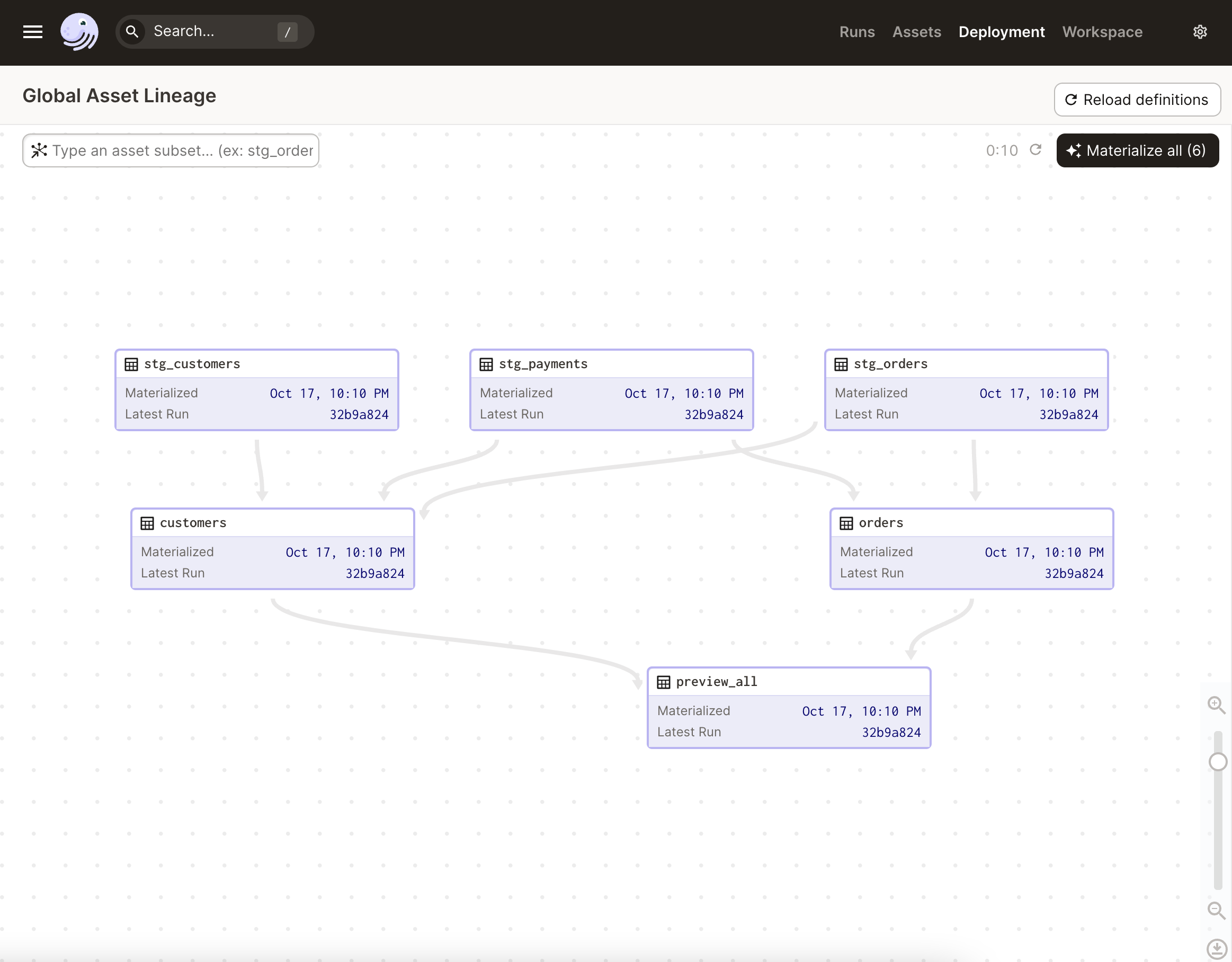
Our Jaffle Shop data pipeline
Now let’s implement the [Jaffle Shop example](https://github.com/dbt-labs/jaffle_shop). We’ll take it step by step. First, clear out everything in `jaffle/assets/__init__.py` and add:
```python
from dagster import asset
from jaffle.duckpond import SQL
import pandas as pd
@asset
def stg_customers() -> SQL:
df = pd.read_csv(
"https://raw.githubusercontent.com/dbt-labs/jaffle_shop/main/seeds/raw_customers.csv"
)
df.rename(columns={"id": "customer_id"}, inplace=True)
return SQL("select * from $df", df=df)
```
This reads some seed data as a CSV file and does some basic Python data transformations with Pandas dataframe to prepare it.
We do some similar things with the two other tables:
```python
@asset
def stg_orders() -> SQL:
df = pd.read_csv(
"https://raw.githubusercontent.com/dbt-labs/jaffle_shop/main/seeds/raw_orders.csv"
)
df.rename(columns={"id": "order_id", "user_id": "customer_id"}, inplace=True)
return SQL("select * from $df", df=df)
@asset
def stg_payments() -> SQL:
df = pd.read_csv(
"https://raw.githubusercontent.com/dbt-labs/jaffle_shop/main/seeds/raw_payments.csv"
)
df.rename(columns={"id": "payment_id"}, inplace=True)
df["amount"] = df["amount"].map(lambda amount: amount / 100)
return SQL("select * from $df", df=df)
```
Next, let’s build a big unified `customers` table with a large DuckDB query.
```python theme=classic
@asset
def customers(stg_customers: SQL, stg_orders: SQL, stg_payments: SQL) -> SQL:
return SQL(
"""
with customers as (
select * from $stg_customers
),
orders as (
select * from $stg_orders
),
payments as (
select * from $stg_payments
),
customer_orders as (
select
customer_id,
min(order_date) as first_order,
max(order_date) as most_recent_order,
count(order_id) as number_of_orders
from orders
group by customer_id
),
customer_payments as (
select
orders.customer_id,
sum(amount) as total_amount
from payments
left join orders on
payments.order_id = orders.order_id
group by orders.customer_id
),
final as (
select
customers.customer_id,
customers.first_name,
customers.last_name,
customer_orders.first_order,
customer_orders.most_recent_order,
customer_orders.number_of_orders,
customer_payments.total_amount as customer_lifetime_value
from customers
left join customer_orders
on customers.customer_id = customer_orders.customer_id
left join customer_payments
on customers.customer_id = customer_payments.customer_id
)
select * from final
""",
stg_customers=stg_customers,
stg_orders=stg_orders,
stg_payments=stg_payments,
)
```
Note that we’re able to reference the previous assets we stored in S3. DuckDB will load them in parallel and only fetch the parts of the file that are needed to serve the query.
These strings can get large, so you may want to use a query builder or templating engine like [Ibis](https://ibis-project.org/docs/3.2.0/), [SQLAlchemy](https://www.sqlalchemy.org/) or [Jinja](https://jinja.palletsprojects.com/), possibly loading the SQL from an external `.sql` file.
Let’s add another complex SQL asset, `orders`:
```python
@asset
def orders(stg_orders: SQL, stg_payments: SQL) -> SQL:
payment_methods = ["credit_card", "coupon", "bank_transfer", "gift_card"]
return SQL(
f"""
with orders as (
select * from $stg_orders
),
payments as (
select * from $stg_payments
),
order_payments as (
select
order_id,
{"".join(f"sum(case when payment_method = '{payment_method}' then amount else 0 end) as {payment_method}_amount," for payment_method in payment_methods)}
sum(amount) as total_amount
from payments
group by order_id
),
final as (
select
orders.order_id,
orders.customer_id,
orders.order_date,
orders.status,
{"".join(f"order_payments.{payment_method}_amount," for payment_method in payment_methods)}
order_payments.total_amount as amount
from orders
left join order_payments
on orders.order_id = order_payments.order_id
)
select * from final
""",
stg_orders=stg_orders,
stg_payments=stg_payments,
)
```
This is largely similar to **`customers`**, except it uses Python code to [preprocess](https://dagster.io/glossary/data-preprocessing) the SQL string by integrating the different **`payment_methods`**.
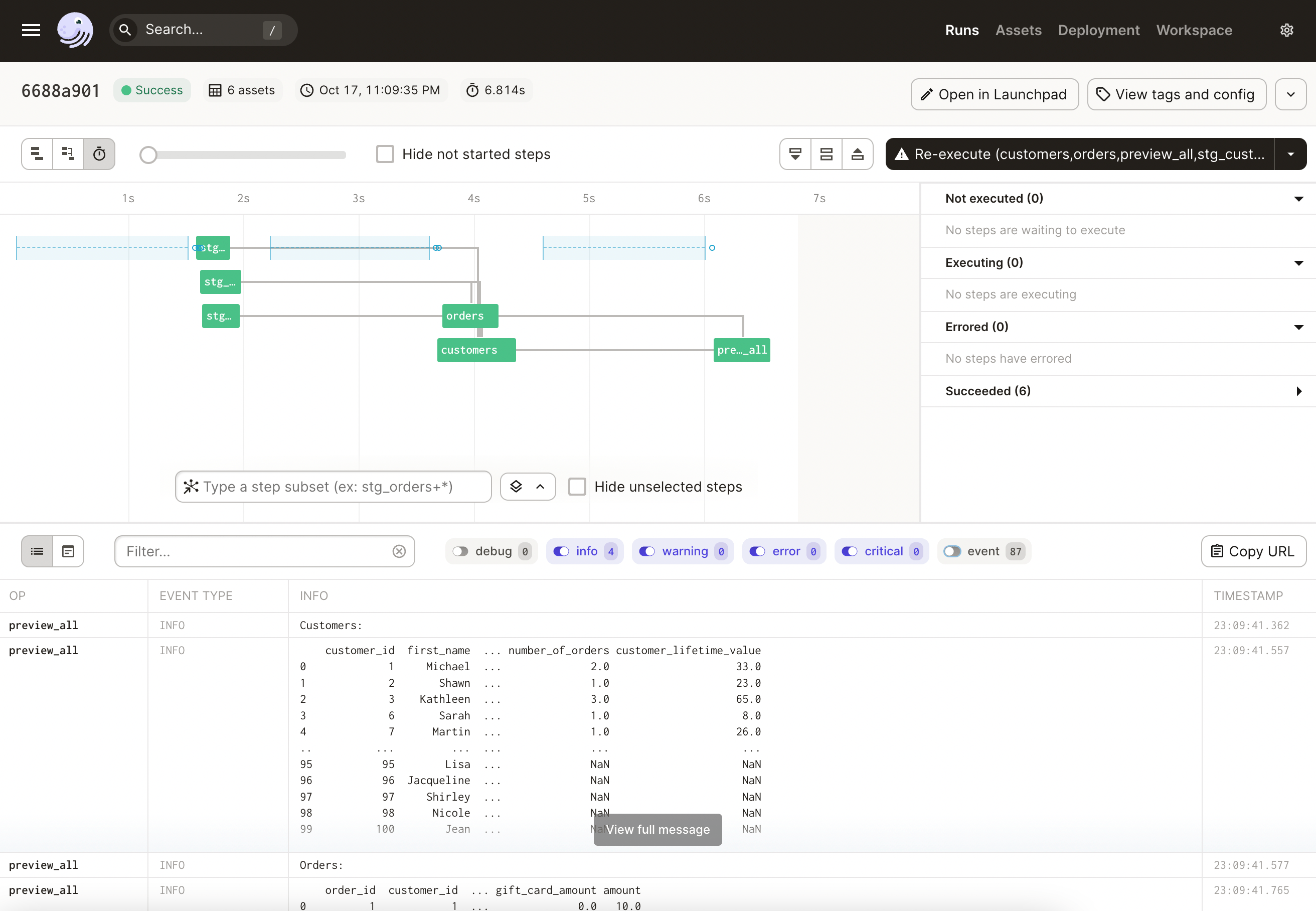
Finally, let’s preview all the assets in the log:
```python
@asset
def preview_all(
context: OpExecutionContext, io_manager: DuckPondIOManager, customers: SQL, orders: SQL
):
context.log.info("Customers:")
context.log.info(io_manager.duckdb.query(customers))
context.log.info("Orders:")
context.log.info(io_manager.duckdb.query(orders))
```
Note that we call `duckdb.query()` to seamlessly access the contents of these `SQL` assets from Python as a `DataFrame`.
Now, reload your project and open it in Dagit to see the full lineage:
You can now run **Materialize All** to materialize your asset graph, and you should see the customers and orders printed to the log.
#### 🧬 Future work
Well, that was a whirlwind tour! Hopefully, you learned a bunch about DuckDB, Parquet, and Dagster.
As mentioned at the beginning of the article, this is probably not something you want to bet on just yet. However, it’s possible that we could see the rise of DuckDB for subsets of your workload that don’t have ultra-high-scale and would benefit from its numerous benefits.
With that said, the natural home for something like this would be inside of dbt. If this design pattern becomes popular, perhaps it will be implemented inside of [dbt-duckdb](https://github.com/jwills/dbt-duckdb), or inside of [Dagster’s dbt integration](https://docs.dagster.io/integrations/libraries/dbt).
Anyway, thanks for reading this far! I hope it was helpful. And don’t forget to [star Dagster on GitHub](https://github.com/dagster-io/dagster)!

### **Great minds think alike**
As we were preparing this article, [Stephen Bailey](https://twitter.com/stkbailey), a Dagster power user, shared a very similar and very insightful take with [the Dagster community](https://dagster.io/slack) called [Dagster's Jaffle Shop](https://github.com/stkbailey/dagster-jaffle-shop).
> As Stephen explains: "This repo is intended to help dbt users understand what Dagster assets are, and how Dagster uses other object classes to declaratively create resources, in much the same way dbt does."