
Rebuilding Airflow's tutorial in Dagster
Dagster took a lot of lessons from Airflow and tried to make the process of developing and maintaining data applications much easier. You can build some really interesting things in Dagster (feel free to look through our [examples](https://docs.dagster.io/examples)), but to showcase some of the differences in building with Dagster vs Airflow, it might be best to use a simple example.
We will build [Airflow’s introductory tutorial](https://airflow.apache.org/docs/apache-airflow/stable/tutorial/fundamentals.html) in Dagster. As we work through this tutorial, we will point out some of the differences in how to develop around Dagster and how to think about data tasks. By the end of this you should see how Dagster can help get you building.## Pipeline Initialization### AirflowThe first step in the Airflow tutorial is to initialize a DAG. Airflow pipelines are constructed at the task level and arranged into DAGs. An Airflow deployment will consist of a number of DAGs and every task must be associated with a DAG:
from airflow.models.dag import DAG

with DAG(
    "tutorial",
    # These args will get passed on to each operator
    # You can override them on a per-task basis during operator initialization
    default_args={
        "depends_on_past": False,
        "email": ["airflow@example.com"],
        "email_on_failure": False,
        "email_on_retry": False,
        "retries": 1,
        "retry_delay": timedelta(minutes=5),
        # 'queue': 'bash_queue',
        # 'pool': 'backfill',
        # 'priority_weight': 10,
        # 'end_date': datetime(2016, 1, 1),
        # 'wait_for_downstream': False,
        # 'sla': timedelta(hours=2),
        # 'execution_timeout': timedelta(seconds=300),
        # 'on_failure_callback': some_function, # or list of functions
        # 'on_success_callback': some_other_function, # or list of functions
        # 'on_retry_callback': another_function, # or list of functions
        # 'sla_miss_callback': yet_another_function, # or list of functions
        # 'on_skipped_callback': another_function, #or list of functions
        # 'trigger_rule': 'all_success'
    },
    description="A simple tutorial DAG",
    schedule=timedelta(days=1),
    start_date=datetime(2021, 1, 1),
    catchup=False,
    tags=["example"],
) as dag:
Dagster
Dagster does not require a DAG or any higher level abstraction. Instead of focusing on unique DAGs and their tasks, Dagster views everything as an asset.
Assets are the building blocks of your data platform and map to the operations that occur within a data stack. An asset could be a file in cloud storage, tables in a database or ML models. Taking an asset based approach to data engineering is more in line with how modern data stacks have evolved where a single asset may have multiple upstream and downstream dependencies.
Dagster does not force you to associate an asset with a single DAG or pipeline. Rather assets and their relations grow organically over time and Dagster is responsible for managing the relationships of your assets.
Nodes
Airflow
Within the Airflow DAG are operators. These are the work performed by Airflow. In order to use an operator it must be initialized as a task. In the tutorial the `BashOperator` is used to execute shell commands. There are many different types of operators you can use in Airflow, all with their own unique parameters and usage (though they all inherit from the `BashOperator`):
from airflow.operators.bash import BashOperator

t1 = BashOperator(
    task_id="print_date",
    bash_command="date",
)

t2 = BashOperator(
    task_id="sleep",
    depends_on_past=False,
    bash_command="sleep 5",
    retries=3,
)
Dagster
As already mentioned, Dagster views work as assets. Dagster also believes that data engineering should feel like software engineering so defining assets feels more Pythonic and similar to writing functions. (Airflow’s closest comparison to assets is the TasksFlow API though that still has limitations compared to Dagster).To define work in Dagster and create assets that execute bash commands, we have several options. We could use Pipes to execute a language other than Python while keeping everything within Dagster orchestration. But to keep in line with the Airflow tutorial we will just use `subprocess` to execute the necessary commands:
import subprocess
import dagster as dg

@dg.asset
def print_date():
   subprocess.run(["date"])

@dg.asset(
    retry_policy=dg.RetryPolicy(max_retries=3)
)
def sleep():
    subprocess.run(["sleep", "5"])
This should look like standard Python. The only Dagster specific is the `dg.asset` decorator which turns these functions into assets. This decorator also allows us to set some execution specific parameters like a retry policy. But overall there is less domain specific knowledge when writing Dagster assets.
Templating
Airflow
The Airflow tutorial contains one final task. This task is meant to highlight the Jinja templating that Airflow supports:
import textwrap

templated_command = textwrap.dedent(
    """
    {% for i in range(5) %}
        echo "{{ ds }}"
        echo "{{ macros.ds_add(ds, 7)}}"
    {% endfor %}
    """
)

t3 = BashOperator(
    task_id="templated",
    depends_on_past=False,
    bash_command=templated_command,
)
Jinja can be useful but it can also be cryptic. If you are not aware of the Airflow macros, you may not immediately understand what this code is doing.
But similar to the other operators in the DAG, this task executes the templated Jinja as a bash command in order to run the `echo` command several times with different dates.
Dagster
Dagster encourages you to be more explicit with your code. Instead of relying on templating or Jinja, you are encouraged to use standard Python. The same result can be achieved with:
from datetime import datetime, timedelta

@dg.asset()
def templated():
    ds = datetime.today().strftime("%Y-%m-%d")
    ds_add = (datetime.today() + timedelta(days=7)).strftime("%Y-%m-%d")
    for _ in range(5):
        formatted_string = f"""
            echo "{ds}"
            echo "{ds_add}"
        """
        subprocess.run(formatted_string, shell=True, check=True)
Documentation
Airflow
You can document your tasks and DAGs in Airflow though it is not always intuitive. After a task has been defined, you can associate documentation with it:
t1.doc_md = textwrap.dedent(
"""\
#### Task Documentation
You can document your task using the attributes `doc_md` (markdown),
`doc` (plain text), `doc_rst`, `doc_json`, `doc_yaml` which gets
rendered in the UI's Task Instance Details page.
**Image Credit:** Randall Munroe, [XKCD](https://xkcd.com/license.html)
"""
)
Dagster
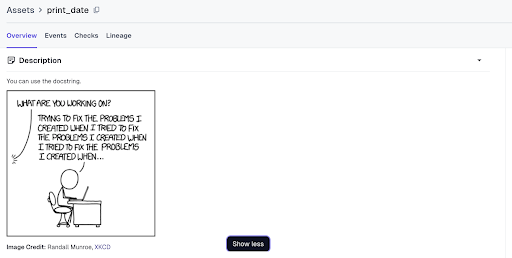
Dagster supports documenting assets by leveraging the Python docstring. This directly couples the documentation with the function making it much easier to keep everything together.
@dg.asset
def print_date():
"""
You can use the docstring.

**Image Credit:** Randall Munroe, [XKCD](https://xkcd.com/license.html)
"""
result = subprocess.run(["date"], capture_output=True, text=True)
print(result)
Markdown is also supported within the docstring so whatever you add will be rendered in the Dagster catalog when viewing your asset.
Setting Dependencies
Airflow
As well as needing to define the DAG and its tasks, you also need to explicitly set the relationship of all the tasks. In the tutorial, tasks `t2` and `t3` are dependent on task `t1`. In order to structure this graph you would set your dependencies like this for your DAG:
t1 >> [t2, t3]
Dagster
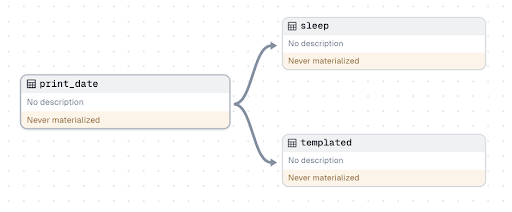
When working in production you likely have dozens if not hundreds of assets. Explicitly defining all of their relationships would be prohibitive. That is why relationships between nodes in Dagster are defined within the assets themselves.In order to create the same graph, you just need to include `print_date` as a dependency within the asset decorator for `sleep` and `templated`:
@dg.asset
def print_date():
	...

@dg.asset(
    deps=[print_date],
)
def sleep(): # asset depends on print_date
	...

@dg.asset(
    deps=[print_date],
)
def templated(): # asset depends on print_date
	...
Letting Dagster maintain your graph is much more manageable and scalable. In the asset catalog you can view all your assets and drill down to the relationships of specific nodes. Because Dagster does not limit your nodes at the DAG level, you can get a fully holistic view of your data mesh.
Launching
Airflow
The final step in the Airflow tutorial is launching a test run of your DAG. You are able to execute Airflow runs from the CLI:
airflow tasks test tutorial print_date 2015-06-01
Using the CLI to execute an Airflow run helps avoid the need to spin up Airflow.
As a service Airflow consists of multiple components. In order to run all of Airflow locally you will need to spin up the database, webserver, and scheduler. Without these running you cannot use Airflow’s UI to execute pipelines.
In order to launch the necessary components locally, you can configure and run `airflow standalone` or launch the components separately:
airflow db init

airflow users create \
    --username admin \
    --firstname Peter \
    --lastname Parker \
    --role Admin \
    --email spiderman@superhero.org

airflow webserver --port 8080

airflow scheduler
Dagster
Dagster makes it possible to jump into the UI as quickly as possible. Assuming you have your asset code saved in a file (say `tutorial.py`) you can use the CLI that comes with the Dagster library to launch the UI:
dagster dev -f tutorial.py
This one command will launch an ephemeral instance containing all the functionality of Dagster. You can view assets in the catalog and experiment with features like schedules and sensors.
It is also much easier to map your dependencies in Dagster. Any environment where you launch dagster dev can be a code location and you can have as many code locations as you want. This lets you tailor the environments for your assets very specifically while still unifying everything with the same orchestration layer.
And if you wish to use an API to invoke Dagster, there is a full GraphQL layer powering all operations within the Dagster UI. This API gives you the ability to programmatically do anything you might need to do outside of the UI itself.
Conclusion
Let's look at the final code for Dagster vs Airflow:
Airflow
import textwrap
from datetime import datetime, timedelta
# The DAG object; we'll need this to instantiate a DAG
from airflow.models.dag import DAG
# Operators; we need this to operate!
from airflow.operators.bash import BashOperator
with DAG(
"tutorial",
# These args will get passed on to each operator
# You can override them on a per-task basis during operator initialization
default_args={
"depends_on_past": False,
"email": ["airflow@example.com"],
"email_on_failure": False,
"email_on_retry": False,
"retries": 1,
"retry_delay": timedelta(minutes=5),
# 'queue': 'bash_queue',
# 'pool': 'backfill',
# 'priority_weight': 10,
# 'end_date': datetime(2016, 1, 1),
# 'wait_for_downstream': False,
# 'sla': timedelta(hours=2),
# 'execution_timeout': timedelta(seconds=300),
# 'on_failure_callback': some_function, # or list of functions
# 'on_success_callback': some_other_function, # or list of functions
# 'on_retry_callback': another_function, # or list of functions
# 'sla_miss_callback': yet_another_function, # or list of functions
# 'on_skipped_callback': another_function, #or list of functions
# 'trigger_rule': 'all_success'
},
description="A simple tutorial DAG",
schedule=timedelta(days=1),
start_date=datetime(2021, 1, 1),
catchup=False,
tags=["example"],
) as dag:
# t1, t2 and t3 are examples of tasks created by instantiating operators
t1 = BashOperator(
task_id="print_date",
bash_command="date",
)
t2 = BashOperator(
task_id="sleep",
depends_on_past=False,
bash_command="sleep 5",
retries=3,
)
t1.doc_md = textwrap.dedent(
"""\
#### Task Documentation
You can document your task using the attributes `doc_md` (markdown),
`doc` (plain text), `doc_rst`, `doc_json`, `doc_yaml` which gets
rendered in the UI's Task Instance Details page.

**Image Credit:** Randall Munroe, [XKCD](https://xkcd.com/license.html)
"""
)
dag.doc_md = __doc__ # providing that you have a docstring at the beginning of the DAG; OR
dag.doc_md = """
This is a documentation placed anywhere
""" # otherwise, type it like this
templated_command = textwrap.dedent(
"""
{% for i in range(5) %}
echo "{{ ds }}"
echo "{{ macros.ds_add(ds, 7)}}"
{% endfor %}
"""
)
t3 = BashOperator(
task_id="templated",
depends_on_past=False,
bash_command=templated_command,
)
t1 >> [t2, t3]
Dagster
import subprocess
from datetime import datetime, timedelta
import dagster as dg
@dg.asset
def print_date():
"""
You can use the docstring.

**Image Credit:** Randall Munroe, [XKCD](https://xkcd.com/license.html)
"""
subprocess.run(["date"])
@dg.asset(
deps=[print_date],
retry_policy=dg.RetryPolicy(max_retries=3),
)
def sleep():
subprocess.run(["sleep", "5"])
@dg.asset(
deps=[print_date],
)
def templated():
ds = datetime.today().strftime("%Y-%m-%d")
ds_add = (datetime.today() + timedelta(days=7)).strftime("%Y-%m-%d")
for _ in range(5):
formatted_string = f"""
echo "{ds}"
echo "{ds_add}"
"""
subprocess.run(formatted_string, shell=True, check=True)
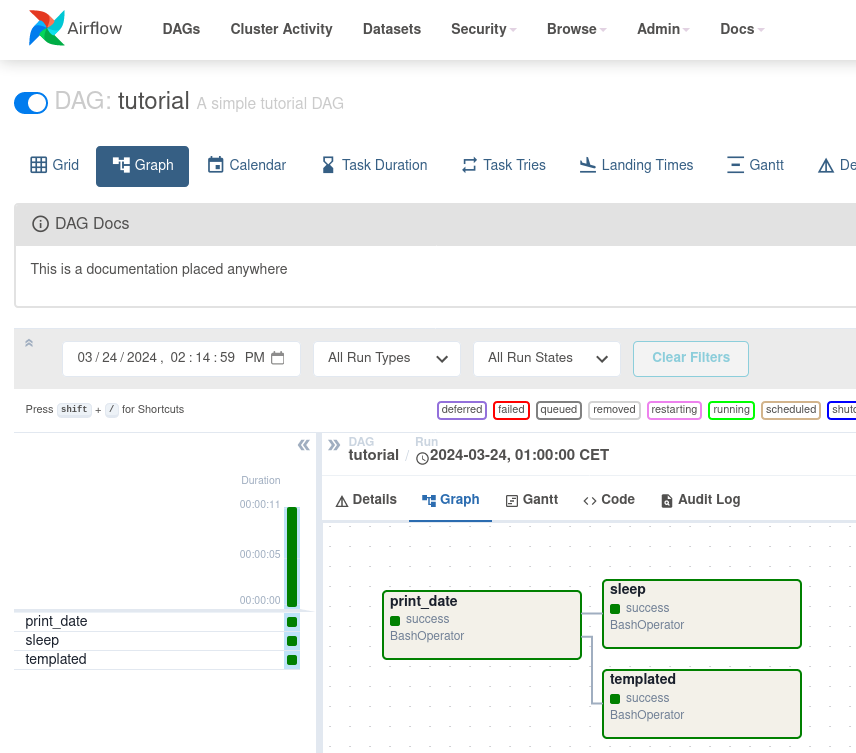
Airflow UI
Dagster UI
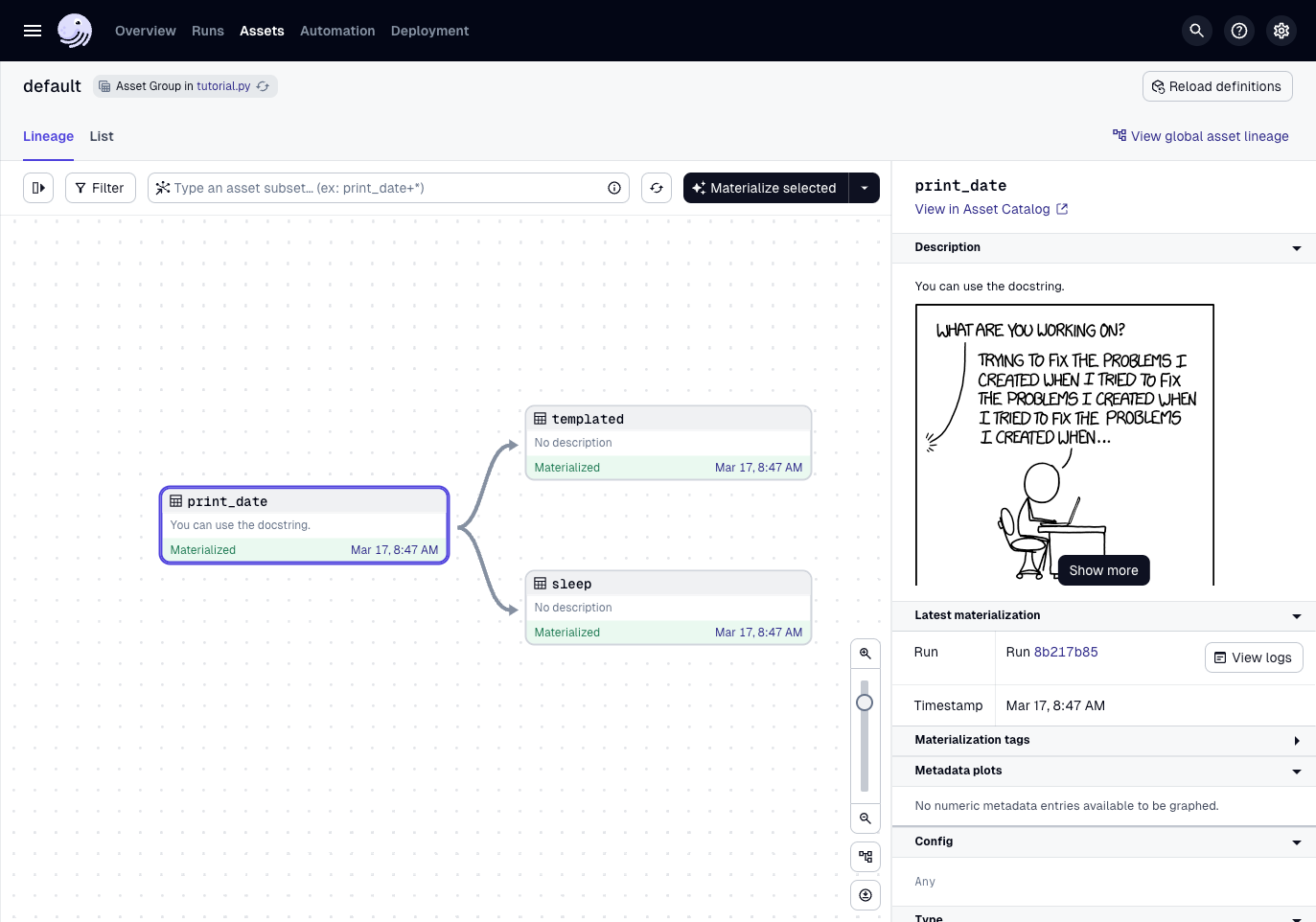
Even if you have never used Dagster before, the Dagster code should feel more Pythonic. When building with data you want to minimize any friction and focus on your assets. Assets are where the value of your data platform live.
This tutorial only scratches the surface of what you can do with Dagster. As you dive deeper, you will appreciate more of the features that enable you to execute assets at scale and build applications that can evolve. But the important thing for now is seeing how easy it is to get started. If you have a data pipeline you have always been meaning to build or a DAG in Airflow you have been meaning to refactor, try giving it a go in Dagster.If you have been working in data for a while you are probably familiar with Airflow. Since its release over a decade ago, Airflow has established many concepts around building data pipelines. However as data engineering continued to evolve, some of Airflow’s practices have become less ergonomic for data engineering.