This article draws on a Dagster+ Hybrid deployment on Kubernetes and Azure at a very large enterprise. It covers the work outside the Helm chart: workload ownership, isolation, networking, identity, sizing, and capacity.
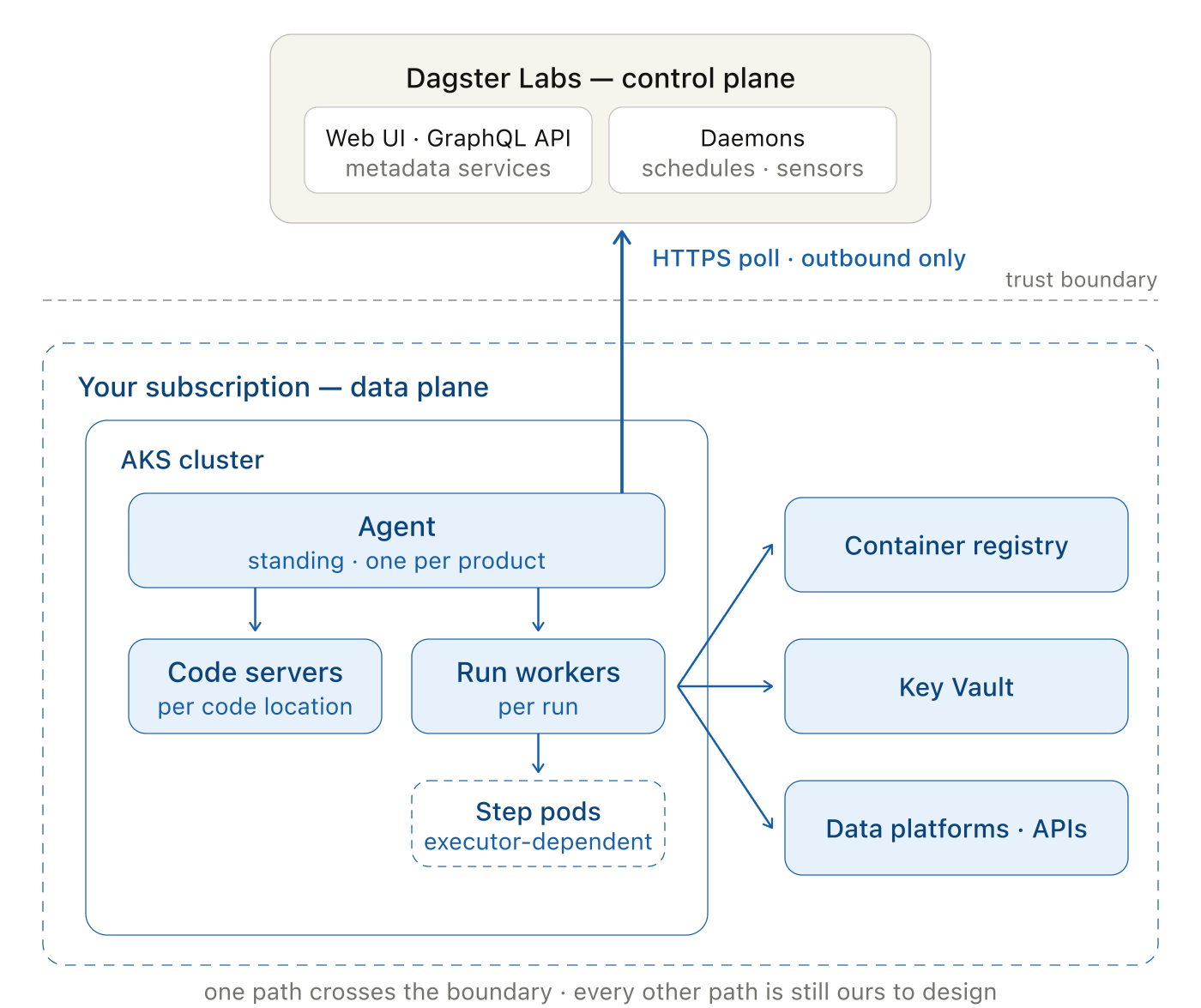
In Dagster+ Hybrid, Dagster Labs operates the control plane. We operate the agent, code servers, and run workers in our Kubernetes data plane.
The agent Helm release was a small part of the deployment. Each run still had to land on the correct node pool, use the correct identity, pull an approved image, reach its Azure dependencies, and produce metrics that the platform team could act on. Those controls all sit on our side of the Hybrid boundary.
We keep that infrastructure out of product repositories through an explicit team boundary. The platform team owns the project template, CI guardrails, agent configuration, cluster, and shared services. Product teams add their Dagster definitions and image through a small, pull-request-based configuration surface. A new team uses the same contract without receiving Kubernetes or Azure administration duties.
The split: control plane theirs, data plane yours
Dagster+ runs the web interface, GraphQL API, metadata services, and the daemons that evaluate schedules and sensors. In a Hybrid deployment, we operate the long-running agent, the code servers that load each code location, and the run workers where pipelines execute. A code location packages one team's Dagster definitions—its assets, jobs, schedules, and sensors—into an image. A code server loads that image and exposes the definitions to the control plane; it does not execute the pipelines.
The agent initiates every Dagster+ connection. It polls the control plane over HTTPS, receives work, launches resources, and sends metadata back. We can therefore restrict Dagster-specific egress to the required endpoints without exposing an inbound service to the vendor.
This egress rule secures the vendor boundary. Product code has separate outbound routes to container registries, data platforms, Key Vault, and other APIs. We design and secure each of those routes.
What a product team sees
Each product-environment has one Kubernetes namespace and one agent. A product may contain several module-specific code locations, each packaging part of the business domain into its own image and release cadence. The agent serves all of them, so adding a module adds a code location rather than another agent.
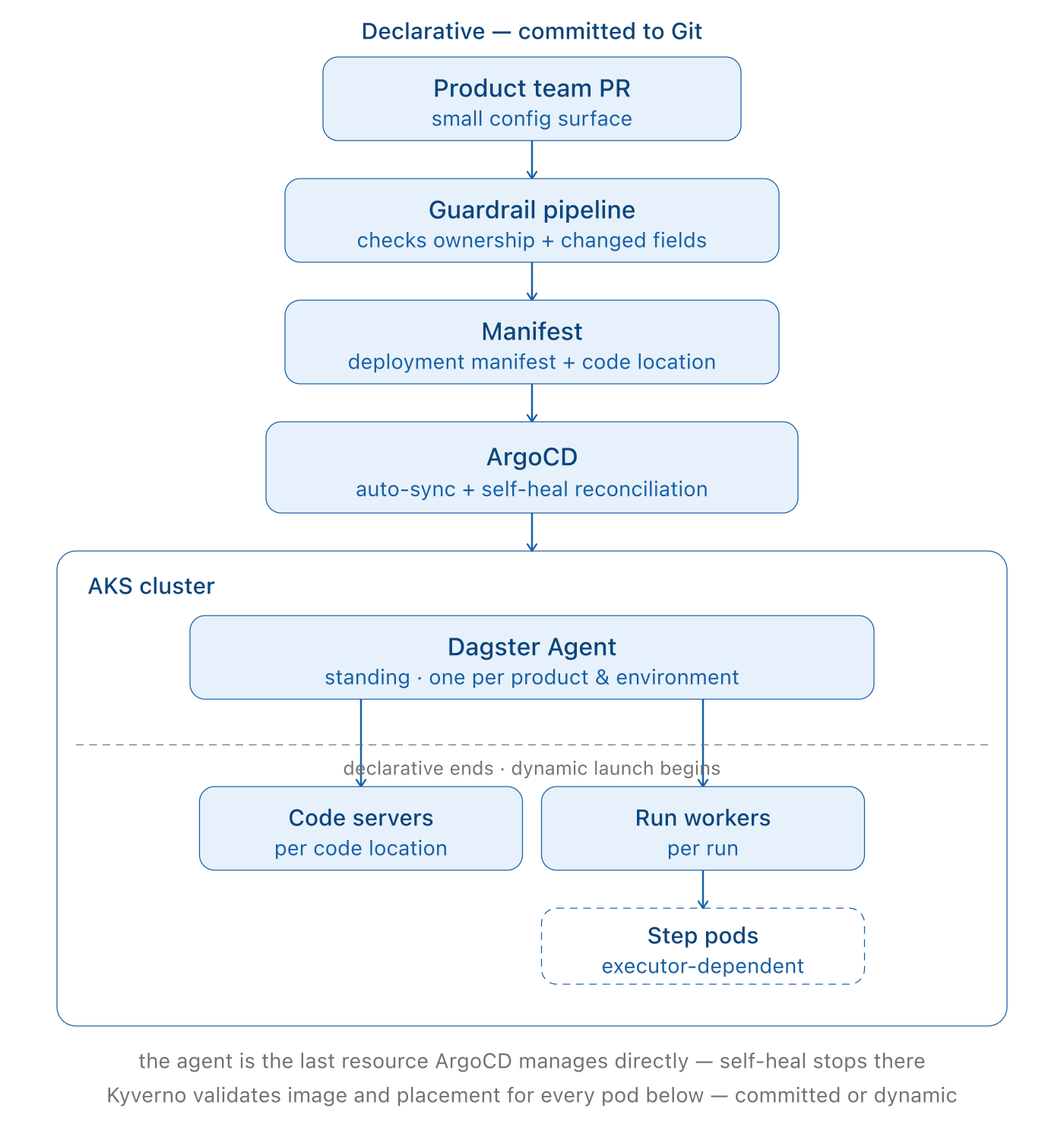
The platform-owned template defines the repository structure and supported configuration. During onboarding, automation generates one ArgoCD Application manifest per product and environment and provisions the corresponding Dagster code location. GitOps installs the product's agent release; the agent launches the code server when the location is deployed.
After onboarding, the product team works through pull requests against its own small configuration surface. A guardrail pipeline checks both ownership and which fields were changed. Product teams can update the settings they are expected to own, while platform defaults and cluster-wide policy remain controlled by the platform team.
The product team changes a small declarative file. At runtime, each Dagster run becomes a Kubernetes Job with a resource request, workload identity, approved image, node-pool placement, and termination policy. Some executors also create step pods as the run fans out. The platform template and admission policies supply those settings.
Three abstractions, one data plane
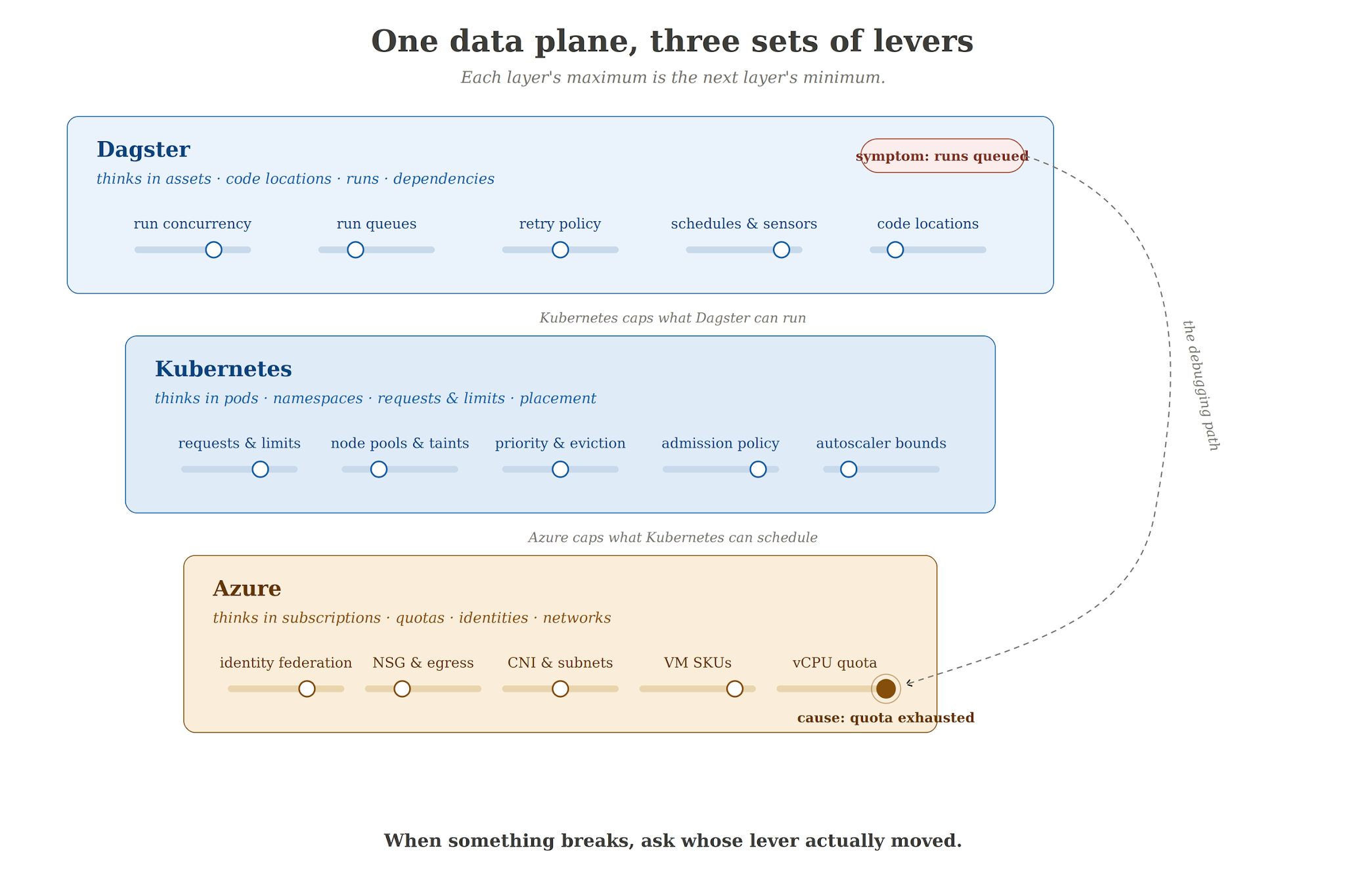
The three systems record different objects for the same unit of work. Dagster records the run, its asset or job selection, and its dependencies. Kubernetes schedules the corresponding Job and pods. Azure supplies the nodes, identities, network routes, and quota behind those pods. None of those records contains the full execution path.
Take the word "environment." We run one AKS cluster with a system node pool and a separate user pool for each environment. Namespaces, service accounts, labels, and admission policy create strong workload boundaries inside Kubernetes, but the control plane and cluster-scoped components are still shared, so the isolation falls short of separate clusters. Azure sees even less separation: the environments share a cluster, network, subscription, and regional quota domain.
A backfill makes the mismatch visible. Depending on its backfill policy, one action can submit a run for every partition or a single run that covers a partition range. A Kubernetes executor can multiply those runs into step pods. The execution model changes the demand again: a dbt job that delegates SQL to a warehouse may leave a relatively light coordinator pod, while in-process Python, pandas, or ML code consumes CPU and memory inside the run or step pod. A run limit therefore has no useful capacity meaning until it is paired with representative run shapes.
If Dagster admits more work than the user pool can place, run workers remain Pending and the autoscaler requests more nodes. Azure quota or regional capacity can reject that request. Users see the delay in Dagster, but the actionable event sits on the autoscaler or Azure side. The run ID, Kubernetes Job, and node-provisioning event must be traceable as one chain.
The foundation: one cluster, many boundaries
We chose one cluster because environment-specific user pools gave us the required scheduling boundary without replicating system pools, Kyverno, External Secrets Operator, CNI configuration, and cluster monitoring for every environment. This reduces baseline capacity and the number of cluster-scoped components we patch and upgrade. The cost is a shared API server, network, and Azure quota domain. Namespaces and node pools cannot provide the fault or security isolation of separate clusters; deployments that require those boundaries should use separate clusters.
Namespaces separate products. Service accounts separate workload identities. Environment labels and placement rules keep workloads on the correct user pools. Kyverno turns those placement and image rules into admission policy, so they are enforced rather than left as conventions.
The remaining shared dependencies live in Azure. Product images come from a container registry. Key Vault is the source of truth for secrets. Entra Workload Identity connects Kubernetes service accounts to Azure identities without placing long-lived Azure credentials inside manifests.
There are two related identity paths worth separating. External Secrets Operator uses its own workload identity to copy selected Key Vault values into Kubernetes Secrets. If that path fails, the visible symptom is usually an unhealthy secret sync or a missing Kubernetes Secret. Product pods can also use their own workload identity to call Azure services directly. A problem in that trust relationship is more likely to appear inside Dagster code as an Azure SDK authentication error.
An Azure SDK authentication error therefore sends us to two places: the pod's Kubernetes service account and the matching Entra federated credential. Kubernetes can show the former but not fully validate the latter.
What a run actually is
ArgoCD owns the declarative Application and Helm release for the standing agent. The Dagster agent manages the code-server lifecycle and launches run workers dynamically. If a Kubernetes executor is used, the run may create additional step pods. These runtime resources stay outside ArgoCD reconciliation.
ArgoCD reconciles only the standing resources tracked by its Application. Adding code servers, run workers, or step pods to that desired state would put GitOps and Dagster in conflict over their lifecycle.
The platform supplies runtime resilience settings through the template: active run workers are protected from avoidable autoscaler eviction, receive favorable scheduling priority under pressure, have a bounded Kubernetes Job retry budget, and get time to shut down after a termination signal. A hard node failure can still kill the pod.
A Kubernetes Job retry is not a Dagster run retry. Kubernetes may recreate a failed pod within the Job's retry budget, but Dagster still owns the status and retry policy of the complete orchestration run.
A code-server container can be alive while it is still importing definitions or initializing resources. Startup, readiness, and liveness probes should distinguish those states so Kubernetes neither restarts a server that is loading nor routes work to one that is unready. We plan to add these probes to the shared code-server defaults. Short-lived run Jobs do not need web-service probes.
Kyverno sits across this dynamic path. It validates that product pods use approved images and are placed in the environment allowed by their namespace. Policies must therefore be written with dynamically launched Dagster pods in mind, not only with Deployments committed to Git.
Agent replicas and long-running code servers consume capacity when no runs are active. Because every product has an agent in every deployed environment, this baseline grows with each onboarding. We size and monitor it separately from run-worker bursts.
Networking at pod scale
With the legacy Azure CNI node-subnet model used by the original cluster, every additional pod consumed an address from the Azure VNet subnet. Aligned schedules or a backfill can create many run and step pods within minutes and exhaust a subnet that looked adequate at steady state.
Our IP plan therefore includes long-running agents and code servers, the maximum concurrent run and step pods, and the temporary nodes added during an AKS upgrade.
Azure CNI Overlay assigns pod addresses from a separate private CIDR. The VNet subnet then needs addresses for nodes and Azure networking resources, while the pod CIDR covers the maximum pod count.
Nodes and load balancers remain in the VNet, and egress traffic is normally translated to a node address. Surrounding NSGs and routes must also allow the overlay pod address space where required. We treat an Overlay migration as a network-estate change because it alters those address and routing assumptions.
Sizing unknown workloads
Kubernetes scheduling and node provisioning use pod resource requests. New products have no workload history, so their first requests are estimates. The required values depend on where the computation happens. A dbt asset that sends SQL to a warehouse may use the pod mainly for orchestration; Python, pandas, or some ML assets may allocate their working set in the pod; workloads delegated to Ray or another compute service need a separate capacity model for that service.
The onboarding template starts with bounded defaults. They must allow the code server to import and the first representative runs to finish, while preventing one unmeasured product from reserving a large share of the user pool.
We put monitoring in place before a product's first run, because the history it produces cannot be recovered later. Metrics need stable product, namespace, and environment dimensions so a new Job name does not break the series. We use Datadog; Prometheus and Grafana, Azure Monitor, or another platform can support the same measurements.
After onboarding, we retain CPU and memory history by product, namespace, environment, and workload type. That history produces a per-product recommendation, which enters the manifest through a human-reviewed pull request. We repeat the review after changes to code, dependencies, schedules, execution model, or data volume.
We set the observation window from the product's business cycle. Roughly four weeks works for the first review in our deployment because it normally includes a monthly or period-end peak. Products with quarterly or irregular workloads need a longer window.
The review looks at high-percentile memory, observed peaks and OOM events, typical CPU use, and burst behavior. Memory requests can then be placed near the stable high-percentile demand, with limits above the observed peak and enough safety margin for variation. CPU requests should represent normal demand. For spiky batch workloads, omitting a CPU limit can avoid unnecessary throttling where shared-cluster fairness and platform policy allow it.
Datadog preserves the history across uniquely named, short-lived Jobs. The product namespace supplies the stable boundary for comparisons over time, so we do not run a separate recommendation service.
Resource settings remain platform-owned. A recommendation becomes a platform-reviewed PR against the product manifest, and ArgoCD deploys the merged state from Git. Future automation may calculate the recommendation and draft that PR; it may not merge the change or modify live resources directly.
AKS Node Auto-Provisioning uses managed Karpenter to choose VM shapes from Pending pod requests instead of scaling fixed-size node pools. Inaccurate requests therefore produce incorrect node choices. AKS documents a feature-gated migration path in which taints and tolerations separate Cluster Autoscaler and NAP workloads. We would use that path only for the cutover: if both provisioners continue reacting to the same Pending pods, they can double-provision capacity.
The concurrency equation
How many runs can the platform execute at once?
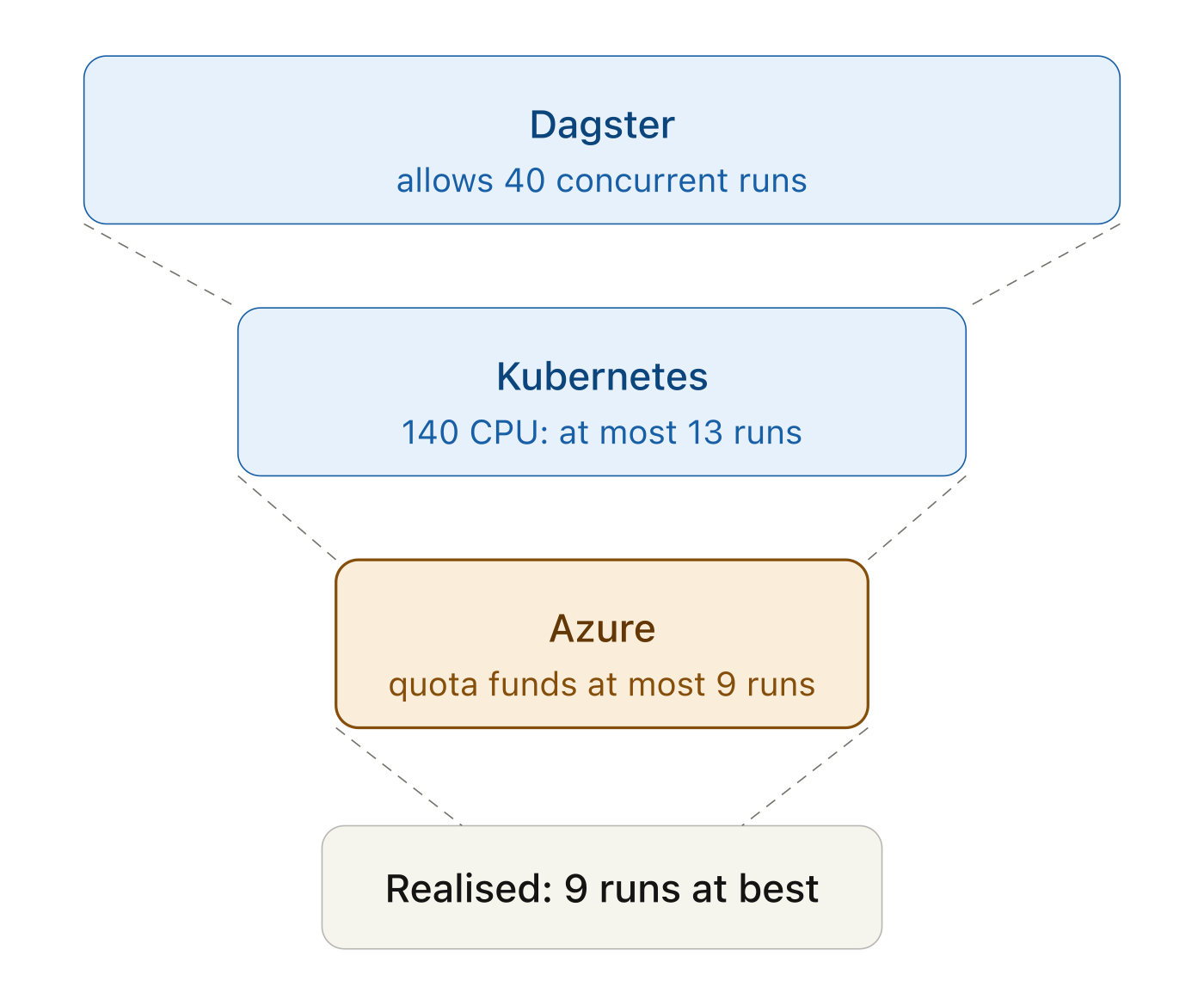
Start with one observed run shape. Suppose Dagster allows 40 concurrent runs and each run reaches a peak of one coordinating worker plus five step pods. If those pods request 11 CPU in total, forty fully active runs request 440 CPU.
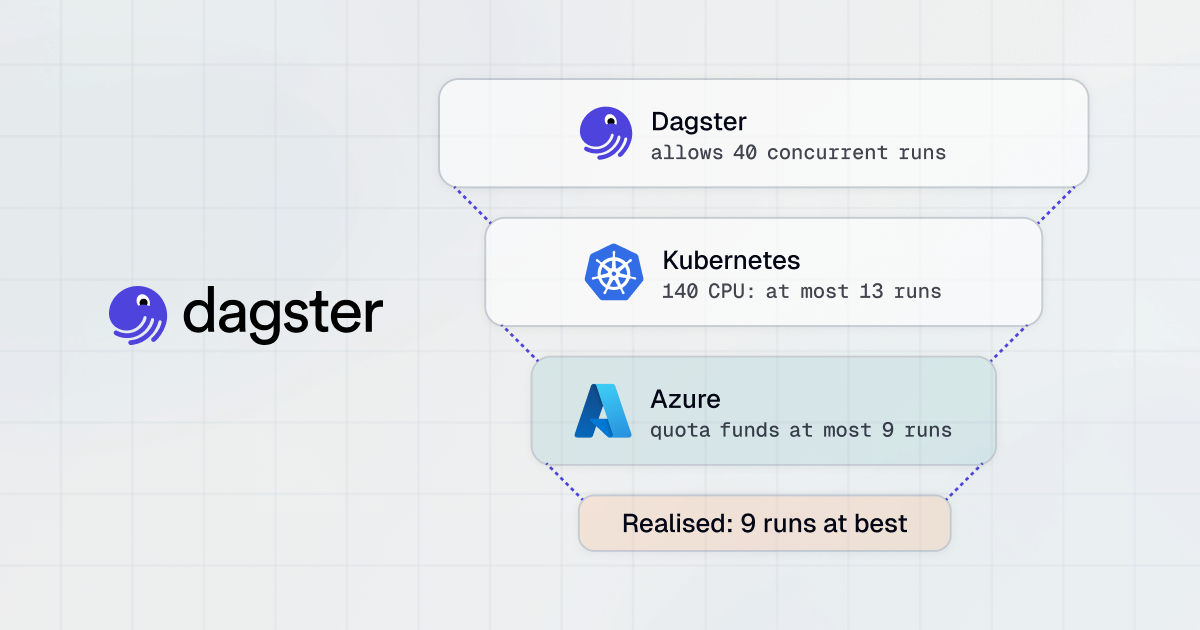
Now compare that demand with the user pool. An eight-vCPU node exposes less than eight CPU to workloads after Kubernetes reservations. A pool of twenty such nodes might offer roughly 140 CPU before accounting for fragmentation and other pods. That gives a planning envelope of thirteen fully fanned-out runs at best, not forty. Azure narrows it again: if regional quota and capacity shared with the other environments fund only fourteen of those nodes, the ceiling falls to nine.
This calculation gives a planning envelope, not a scheduler forecast. Kubernetes schedules each pod independently, run shapes vary, and runs spend only part of their lifetime at peak fan-out. The Dagster concurrency limit caps admitted runs; it does not reserve the infrastructure for them.
The platform should treat the settings as one capacity model:
- define representative run shapes from observed data;
- translate node allocatable resources and pool limits into approximate run slots;
- verify that Azure quota can fund the intended maximum;
- set Dagster queue limits below the measured infrastructure capacity;
- choose headroom from workload variance and recovery time, not from an arbitrary percentage.
We cap work in Dagster before it becomes a large collection of Pending pods. A queued run is visible to the user and keeps the pressure at the orchestration layer. The platform team owns the deployment-wide max_concurrent_runs setting; product teams cannot raise it through their configuration. Tag-based limits can reserve capacity between code locations, and staggering two heavy schedules can remove a peak without adding nodes.
Operating at scale: the platform as a product
Each product-environment pair adds an agent Helm release, namespace, code location, image, and versioned configuration. The number of upgrade targets therefore grows with every onboarding.
Hybrid upgrades have one ordering constraint: the agent must move first, before a code location adopts a newer Dagster version. Because each product pins its own agent chart, one platform upgrade produces a separate rollout for every product and environment.
A platform-owned wrapper chart would centralize Kubernetes defaults, health settings, and the supported upstream agent chart. CI must validate the Dagster Python package already built into each product image because Helm cannot change it. Dagster allows code locations to use a different version from the agent, so the cutover does not require a lockstep release: we can upgrade agents first, then let product images adopt the supported package version in stages. Every deployed artifact remains pinned.
The guardrail pipeline enforces ownership. The platform owns agent configuration, shared charts, cluster policy, and CI controls. Product teams own their code, images, and the fields allowed by the product schema. ArgoCD SSO and RBAC can apply the same boundary to visibility, allowing a team to inspect its own deployment without changing another product or a platform component.
The code-location and namespace pair is an execution boundary, not the complete data-access boundary for a domain. Dagster ownership metadata identifies the responsible team, while Kubernetes service accounts and Azure identities control runtime access. Rules for which domain outputs other teams may consume belong in the data platform itself—for example, dbt model access and warehouse grants—and remain separate from pod isolation.
We consider the platform ready for another product when:
- a product can be onboarded without a person editing the cluster;
- product changes are constrained by an automated ownership contract;
- resource defaults are reviewed against observed behavior;
- advertised concurrency is backed by a capacity model;
- chart and Python package versions move through a controlled sequence;
- an incident can be followed from the Dagster symptom through Kubernetes to the Azure cause.
Own the chain
Product teams should not have to correlate Dagster, Kubernetes, and Azure consoles. Dagster is their operational entry point, so queue state and capacity throttling need to be visible there. The platform team still needs the next links: run and code-location identifiers on Kubernetes metrics and logs, plus node-provisioning and quota signals from Azure.
A shared dashboard can join those signals into one support path: start with a queued or failed run, find its Job and pod events, then inspect the node or Azure capacity request. This removes tool boundaries for the product team and gives the platform on-call one traceable chain instead of three unrelated status pages.
The product team sees its generated manifest, pull-request checks, run status, and logs. It does not need cluster or subscription access to diagnose routine queueing and failures.
Dagster Labs operates the control plane. We remain accountable for every step after the agent receives work, and for making those steps legible to the teams that use the platform.