
This post introduces a custom async executor for Dagster that enables high-concurrency fan-out, async-native libraries, and incremental adoption, without changing how runs are launched or monitored.
Every team has its own infrastructure, workflows, constraints, and wild ideas. One of the things that drew me to Dagster in the first place is that its internals are designed to be deeply configurable, extensible, and hackable in all the best ways. Nearly every abstraction layer can be customized in ways the original designers couldn’t fully anticipate.
In this post, I’ll walk through why I built a custom async executor for Dagster (dagster-async-executor), the problems it’s designed to solve, and how you can use it effectively in your own Dagster deployments.
What is a Dagster Executor?
Before diving into the async executor, it helps to step back and talk about executors more generally. Even if you’ve never configured one explicitly, every Dagster job runs under an executor. Once a run has launched and Dagster has allocated a run worker process, the executor is responsible for orchestrating what happens inside that process.
Here’s a small example that illustrates a simple fan-out / fan-in pipeline:
import dagster as dg
import time

NUM_FANOUTS = 5
SLEEP_SECONDS = 5


@dg.op(out=dg.DynamicOut())
def create_dynamic_outputs():
    """Creates a dynamic number of outputs."""
    for i in range(NUM_FANOUTS):
        yield dg.DynamicOutput(value=f"item_{i}", mapping_key=f"key_{i}")


@dg.op
def process_item(
    context: dg.OpExecutionContext, item: str
):
    """Process each item from the fan-out."""
    context.log.info(f"[{context.op_handle}] sleeping...")
    time.sleep(SLEEP_SECONDS)
    context.log.info(f"[{context.op_handle}] completed")
    return item


@dg.op
def collect_results(context: dg.OpExecutionContext, results: list):
    """Collect all results from the fan-out."""
    context.log.info(f"[{context.op_handle}] collected {len(results)} results")
    return results
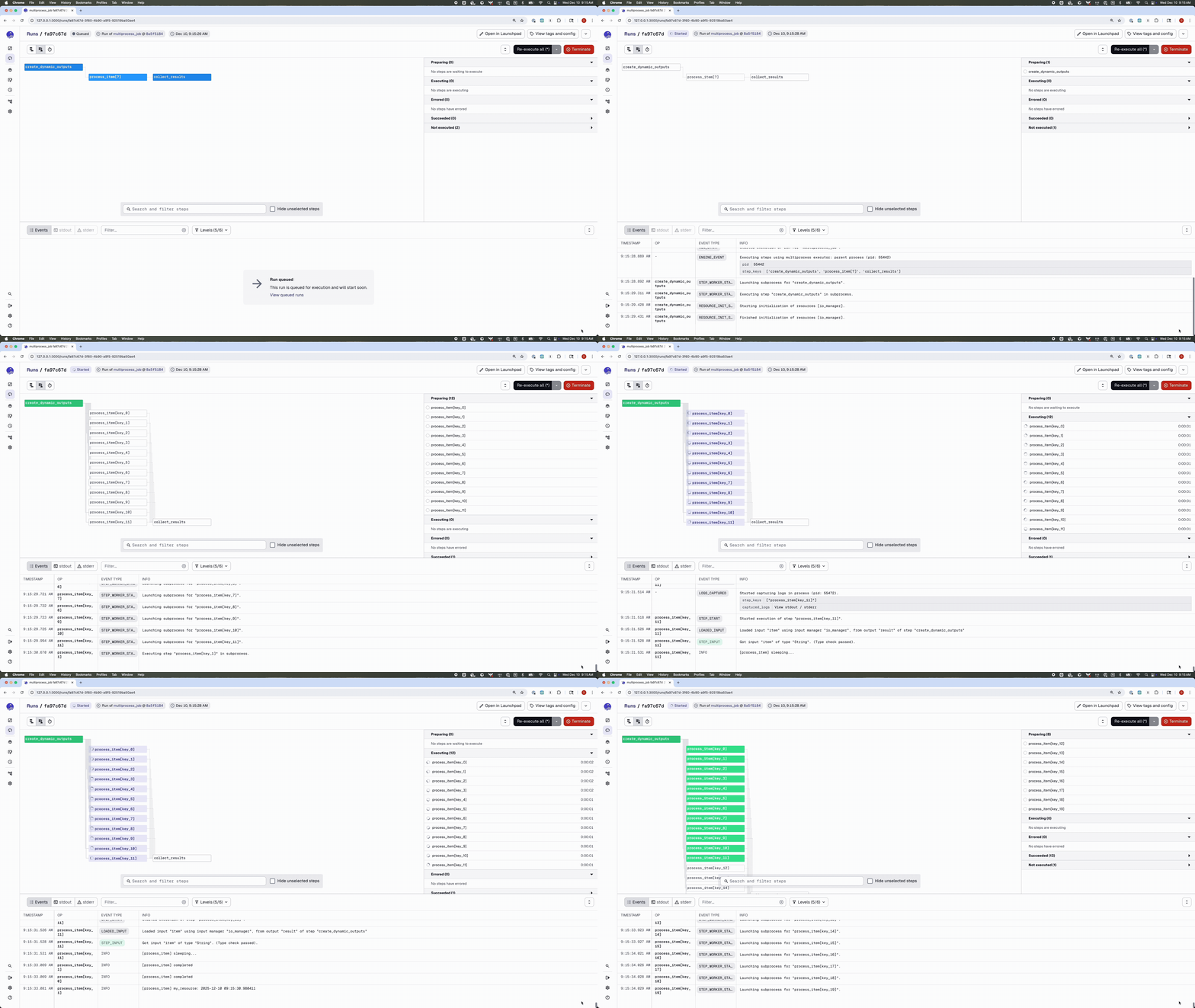
By default, jobs run with the multi_or_in_process_executor, which—as the name suggests—supports two execution modes: multiprocessing and single-process execution. You can also override the executor on a per-job basis:
# By default concurrency is set to 10
@dg.job(executor_def=dg.multiprocess_executor)
def multiprocess_job():
    dynamic_items = create_dynamic_outputs()
    processed = dynamic_items.map(process_item)
    collect_results(processed.collect())
@dg.job(executor_def=dg.in_process_executor)
def single_process_job():
    dynamic_items = create_dynamic_outputs()
    processed = dynamic_items.map(process_item)
    collect_results(processed.collect())
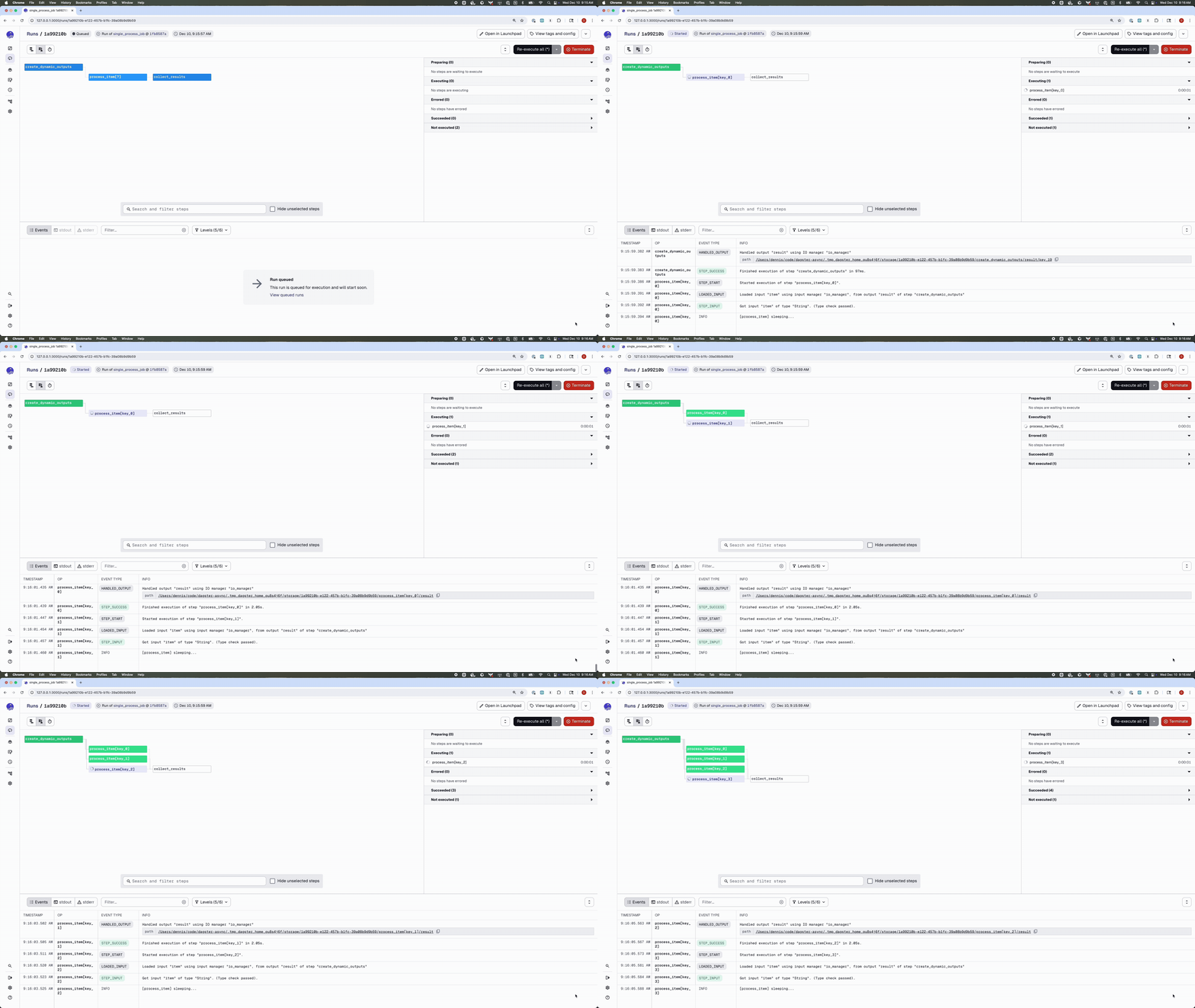
I’ve found single-process execution particularly useful when I want to maintain state across ops.
Dagster also supports a range of other executors, Dask, Celery, Docker, Kubernetes, and combinations of them like Celery + Kubernetes or Celery + Docker, which makes it possible to adapt execution to very different infrastructure and scaling needs.
Async in Data Workflows
Having multiple executors for different infrastructures is incredibly useful, but they all share one important characteristic: they’re synchronous.
That makes sense given how data orchestration systems have traditionally been used. Most pipelines spend their time coordinating external systems, data warehouses, distributed compute engines, object stores, APIs, and those interactions are predominantly blocking. Submitting a job to Spark or Snowflake, polling its status, loading files from S3, or running a SQL transformation are all synchronous operations in the underlying libraries. For a long time, synchronous execution mapped naturally to how data engineering workloads behaved.
But the landscape has been changing.
As I started working on machine learning pipelines, fine-tuning workflows, multimodal inference, real-time enrichment, and more complex integration patterns, I noticed that a growing portion of the work was I/O-bound rather than CPU-bound. Instead of spending most of their time transforming local data, these pipelines spend much of their time waiting, for GPUs to free up, for models to respond, for inference APIs to return results, for embeddings to be computed remotely, or for large numbers of lightweight tasks to complete concurrently.
A few concrete patterns kept coming up for me:
1. High-fan-out inference or embedding generation
Calling an LLM or embedding API hundreds or thousands of times in series is slow. Doing it in parallel with threads is often expensive and can drain system resources. With async, a single process can juggle many network-bound calls at once.
2. Streaming and real-time enrichment
When a pipeline consumes events from Kafka, pulls context from vector stores, enriches them via a model, and emits results downstream, an event-loop-driven async model fits naturally.
3. Lightweight micro-workflows inside a single run
For patterns like “check all my partitions,” “validate N remote models,” or “fetch metadata for hundreds of objects,” async can drastically reduce end-to-end latency.
4. Interacting with modern async-native libraries
Many newer Python libraries, FastAPI, async cloud clients, async database drivers, are built around async from the ground up. Using them in a synchronous context usually means workarounds, thread pools, or awkward adapters.
Dagster already has excellent support for scaling out CPU-bound workloads using processes, Dask, Celery, and Kubernetes. But for these highly concurrent, I/O-heavy patterns, what I really wanted was native async execution inside a single run worker. That’s exactly the gap dagster-async-executor is meant to fill.
Async Executor
I built dagster-async-executor as a community integration that adds an AsyncExecutor to Dagster. It’s an alternative in-process executor, designed to make it easy to take advantage of async execution without having to hand-roll event loops or manage thread pools yourself.
At a high level, it lets you:
- Write
asyncops and assets naturally. - Mix sync and async ops in the same job.
- Use dynamic and fan-out graphs, including async upstream and downstream dependencies.
- Keep the familiar Dagster executor interface, while making I/O-heavy workloads much more concurrency-friendly.
From the outside, nothing about how you launch or monitor a run changes. The difference is entirely in how work is scheduled inside the run worker.
Here’s the earlier fan-out example rewritten to use the async executor. Because the work is I/O-bound, we can use a much larger fan-out than in the synchronous version:
import anyio
import dagster as dg
from dagster_async_executor import async_executor

NUM_FANOUTS = 300
SLEEP_SECONDS = 3


@dg.op(out=dg.DynamicOut())
async def async_create_dynamic_outputs():
    """Creates a dynamic number of outputs."""
    for i in range(NUM_FANOUTS):
        yield dg.DynamicOutput(value=f"item_{i}", mapping_key=f"key_{i}")


@dg.op
async def async_process_item(context: dg.OpExecutionContext, item: str):
    """Process each item from the fan-out."""
    context.log.info(f"[{context.op_handle}] sleeping...")
    await anyio.sleep(SLEEP_SECONDS)
    context.log.info(f"[{context.op_handle}] completed")
    return item


@dg.op
async def async_collect_results(context: dg.OpExecutionContext, results: list):
    """Collect all results from the fan-out."""
    context.log.info(f"[{context.op_handle}] collected {len(results)} results")
    return results


@dg.job(executor_def=async_executor)
def async_fanout_job():
    # No need to use `await` here – job definitions are still synchronous.
    dynamic_items = async_create_dynamic_outputs()
    processed = dynamic_items.map(async_process_item)
    async_collect_results(processed.collect())
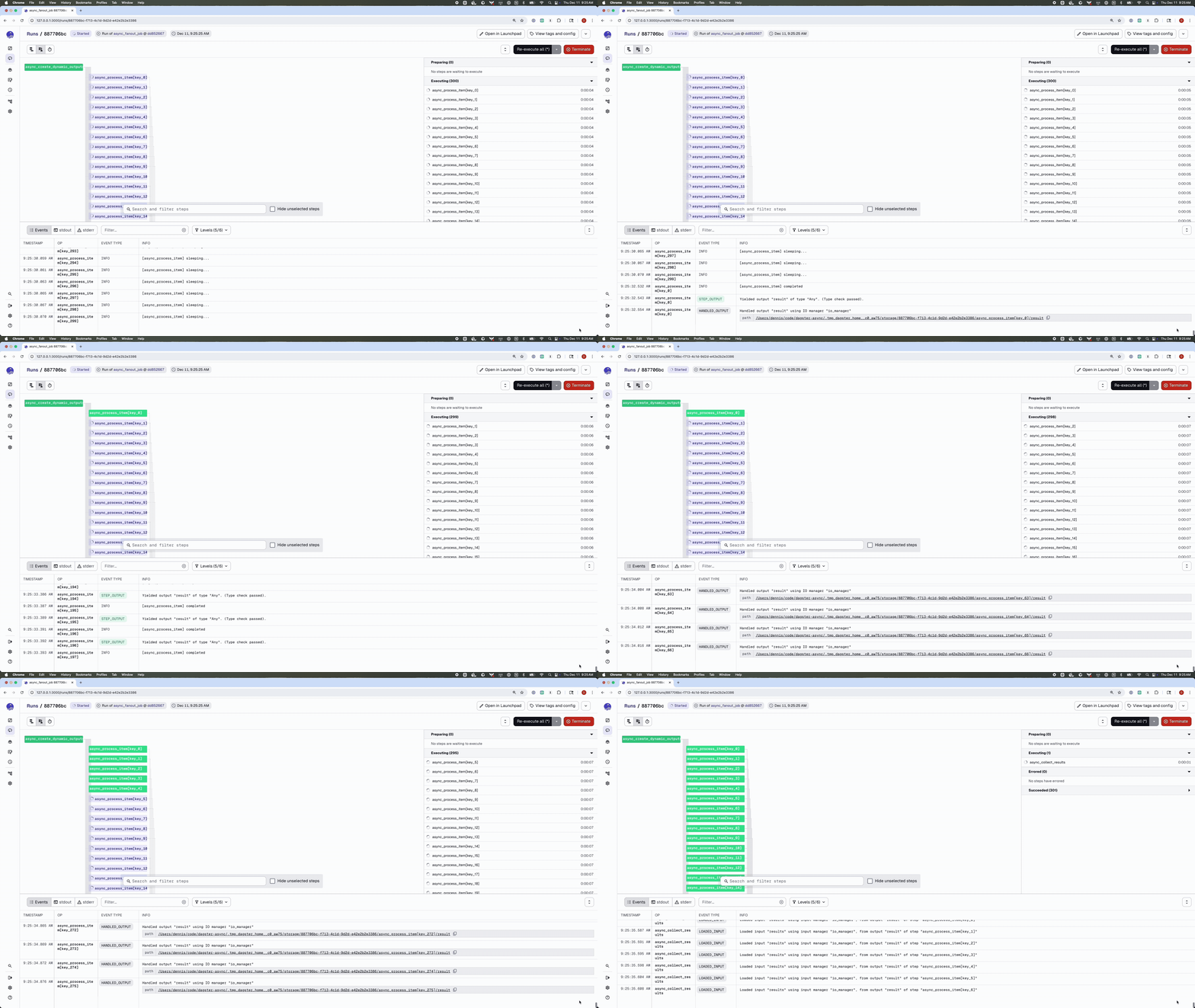
Compared to the earlier synchronous example, there are a few key differences:
- Ops are defined with
async def, and theyawaitI/O or sleep calls instead of blocking. - The job is configured with
executor_def=async_executor.
From Dagster’s point of view, this is still “just a job.” You don’t call it with await, and you don’t need to think about event loops at the call site.
What you do get is the ability to scale out I/O-bound fan-outs, like hundreds of concurrent API calls, within a single worker process, without resorting to a forest of threads.
How it works
Conceptually, the async executor looks a lot like Dagster’s in-process executor, with one important twist. Instead of driving steps in a synchronous loop, I hand them off to an async orchestration layer running inside an event loop.
You don’t need to understand every implementation detail to use it, but having a rough mental model can be helpful when you’re thinking about performance or debugging.
At a high level, execution goes through three phases:
1. Plan creation (synchronous)
The run, execution plan, and execution context are all created synchronously, just like they are with the in-process executor and other built-in executors.
2. Async orchestration loop
Once the plan is ready, an async orchestrator takes over. I designed this layer to:
- Run inside an
anyio.TaskGroup. - Schedule each “ready” step as an async task.
- Stream events from each step back to the executor using an
anyio.MemoryStream.
This is where the concurrency comes from: many step workers can be active at once, all driven by a single event loop.
3. Sync-to-async event bridge
Dagster’s core execution machinery still expects an executor to return a plain Iterator[DagsterEvent]. To preserve that contract, I added a small bridging layer:
- The async orchestrator runs inside an
anyio.BlockingPortal. - Each emitted
DagsterEventis pushed into a queue.Queue.- The executor exposes a synchronous iterator that pulls events from the queue and yields them to Dagster.
From Dagster’s point of view, this is still “just another synchronous executor” that yields events. Under the hood, though, it’s managing an async task group and streaming events back across that bridge.
Because the async executor reuses Dagster’s existing execution plan machinery, you keep:
- The same resource initialization semantics.
- The same logging and event stream.
- Compatibility with existing tooling and entry points.
One of my main design goals was to avoid splitting the world into “sync Dagster” and “async Dagster.” Instead, the async executor treats all steps uniformly, regardless of whether they’re defined with def or async def.
That has a few nice consequences:
- You can freely mix sync and async ops:
- Async upstream → sync downstream.
- Sync upstream → async downstream.
- Dynamic fan-out continues to work as expected:
- Async producers can yield dynamic outputs.
- Downstream mapped steps can be either sync or async.
- Error handling remains familiar:
- Exceptions in async ops are converted into standard Dagster
STEP_FAILUREevents. - Downstream steps are cancelled or skipped according to the existing rules.
- Exceptions in async ops are converted into standard Dagster
The net effect is that you can adopt async incrementally. You can start by converting one or two I/O-heavy ops to async def, switch the job to use async_executor, and leave everything else, resources, logging, and synchronous ops, exactly as it was.
Choosing When to Use the Async Executor
I’ve found the async executor works best when a job needs to keep many I/O operations active at the same time. If an op spends most of its lifetime waiting on network responses, API calls, metadata services, or other remote systems, async execution lets a single run worker continue making progress on many tasks concurrently. In practice, this often turns large fan-outs or metadata-heavy micro-workflows from slow, sequential operations into fast, highly concurrent ones, without adding threads or extra infrastructure.
On the other hand, if a job is dominated by CPU-intensive work or relies on libraries that block the event loop, traditional executors like multiprocess, Dask, or Celery are a better fit. I don’t see the async executor as a replacement for distributed compute. Its strength is in efficiently coordinating large numbers of small, latency-sensitive I/O tasks inside a single Dagster run, and it performs best when used in that context.