


What Is Azure Data Catalog?
Azure Data Catalog is a cloud-based metadata repository offered by Microsoft. It enables organizations to register, discover, understand, and consume data sources on Azure and beyond. With Data Catalog, data assets are indexed with metadata and searchable via a web-based portal, improving collaboration among data consumers, data stewards, and technical teams.
Azure Data Catalog is now End of Life (EOL)
Microsoft officially retired Azure Data Catalog on May 15, 2024. As of this date, the service is no longer available and new instances cannot be created.
Users of Azure Data Catalog were encouraged to migrate to Microsoft Purview, which offers a more advanced data governance platform, including a data catalog solution called Unified Catalog. It supports automated data discovery, sensitive data classification, and end-to-end data lineage tracking. Purview enables organizations to manage data across on-premises, multi-cloud, and SaaS environments.
The shift to Microsoft Purview ensures continued support for data cataloging needs while introducing stronger data security features and broader governance tools. Organizations are advised to review migration plans and associated pricing well ahead of the retirement deadline. Support for existing Azure Data Catalog resources will remain in place until the cutoff date.
What Is Microsoft Purview Unified Catalog?
Microsoft Purview Unified Catalog is the evolution of data cataloging in Azure, built to unify governance, discovery, and access management in a single SaaS platform. Unlike earlier catalog tools, it secures and standardizes data while helping organizations extract business value from it.
The catalog introduces a federated governance model. This combines centralized policy setting with decentralized ownership, so teams can manage their own data while still complying with enterprise-wide standards. This approach helps reduce bottlenecks while maintaining consistency in security, quality, and access control.
Unified Catalog supports multiple roles across the data lifecycle. Data consumers can search, discover, and request access to datasets through governance domains, data products, or AI-powered search. Data stewards and owners can curate, annotate, and manage data with policies tied to glossary terms and critical data elements. Executives and officers can monitor the overall health of the data estate, track quality scores, and align usage with organizational objectives.
Key capabilities of Microsoft Purview include:
- Access policies that balance self-service access with compliance
- Governance domains to organize assets by business concepts
- Data products that group related assets for easier discovery and reuse
- Glossary terms and critical data elements that standardize context and enforce consistent governance
- Health management tools that score data quality and provide actions to improve governance
Tutorial: Discovering Data with Microsoft Purview
To discover data in Microsoft Purview Unified Catalog, you use the Discovery tools available in the portal. Depending on your role and permissions, you can search and browse either data products or data assets.
Screenshots in this section were sourced from azure.microsoft.com.
Step 1: Searching for Data Products
Data products are curated, ready-to-use collections of assets created for business use.
- In the Purview portal, go to Unified Catalog > Discovery > Data products.
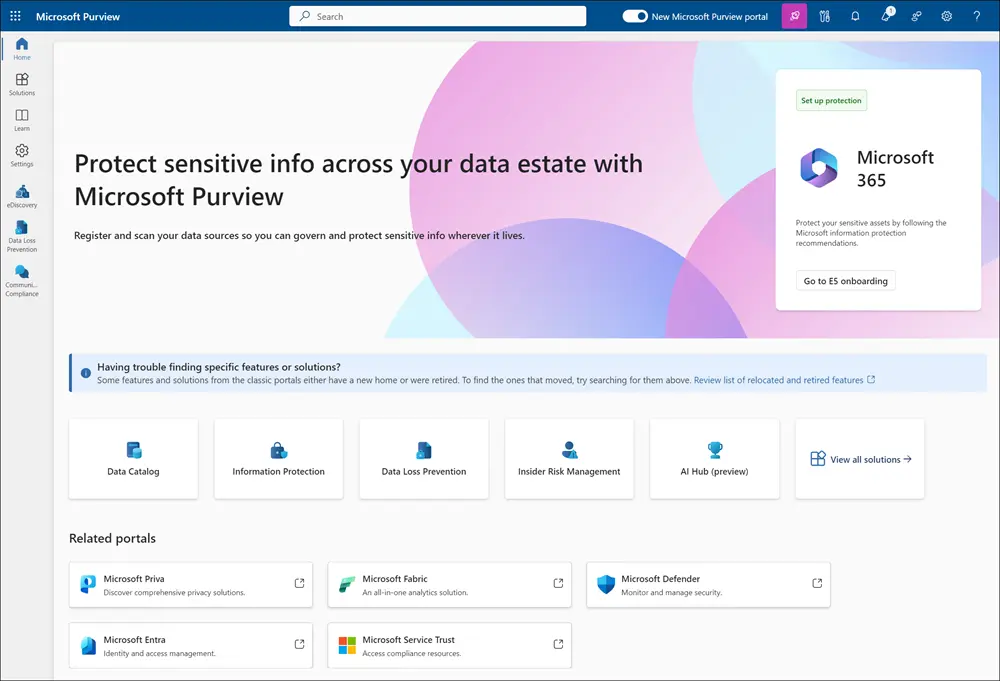
- You can search by keywords (for example, “sales”) or use natural language search (preview), which accepts queries in English, French, or Spanish.
- Results are matched against product metadata such as name, description, associated glossary terms, governance domains, and included assets.Filters let you refine results by governance domain, product type, owner, glossary term, or critical data element.
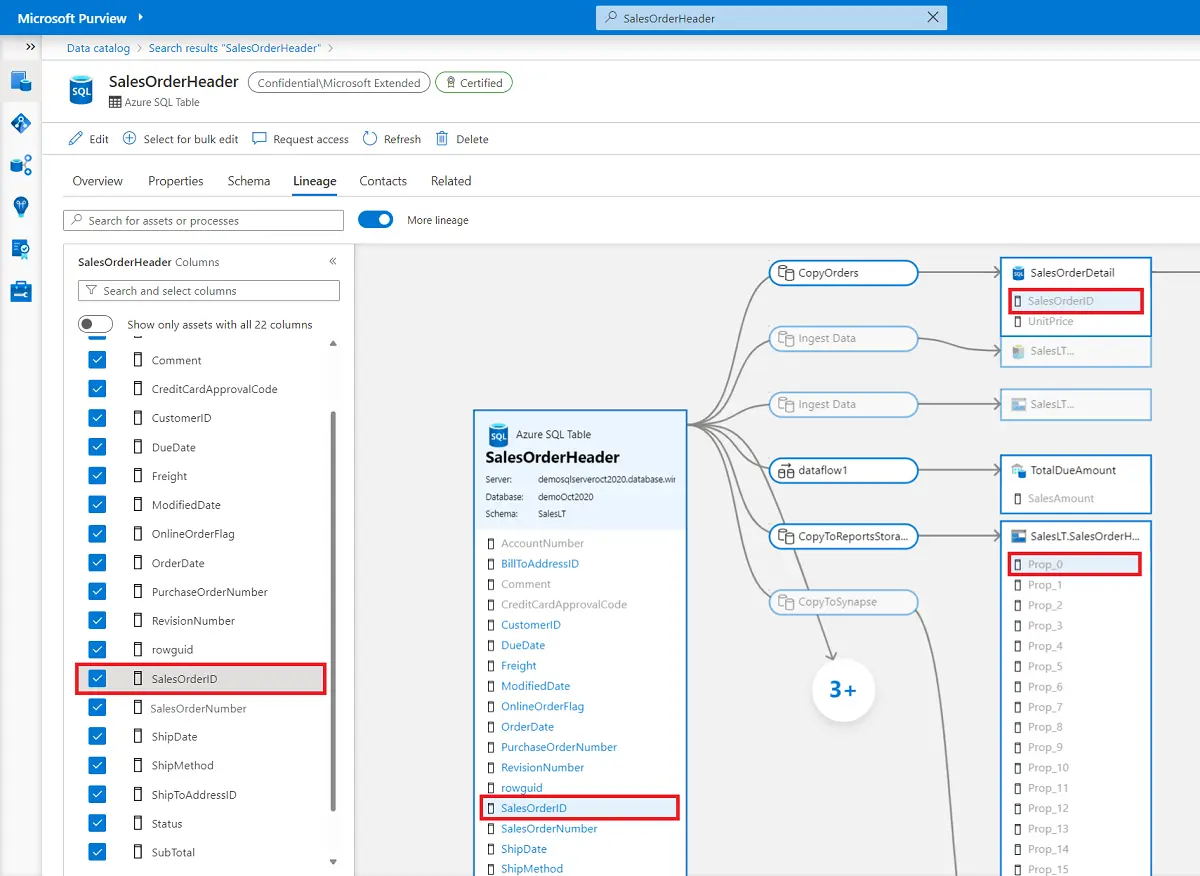
- Filters let you refine results by governance domain, product type, owner, glossary term, or critical data element.
Selecting a product opens its details page, which shows its description, terms of use, glossary terms, and linked data assets. Each linked asset can be opened further for schema, lineage, and ownership details.
Step 2: Browsing by Governance Domain
Instead of searching, you can browse data products organized by governance domains.
- From Discovery > Data products, select a domain to view its products.
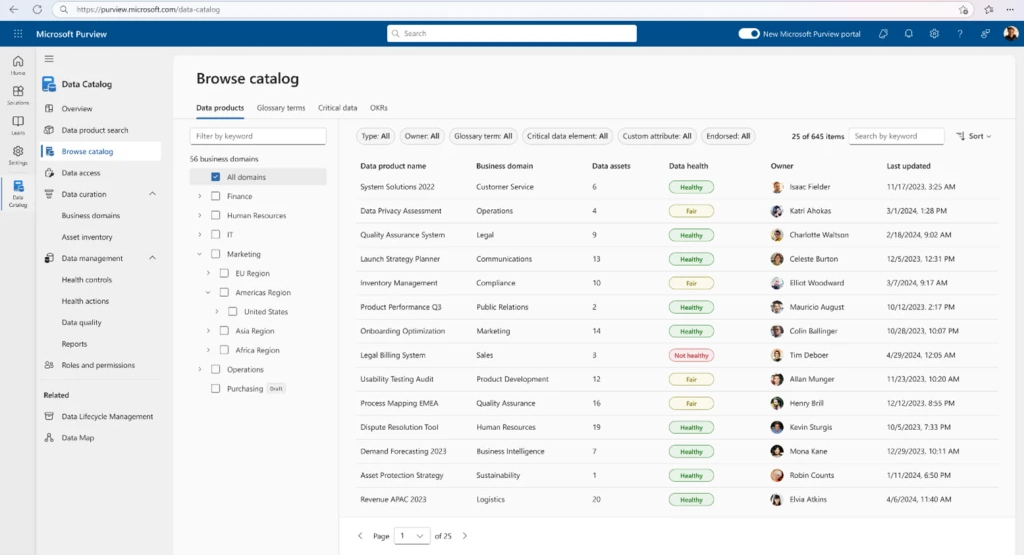
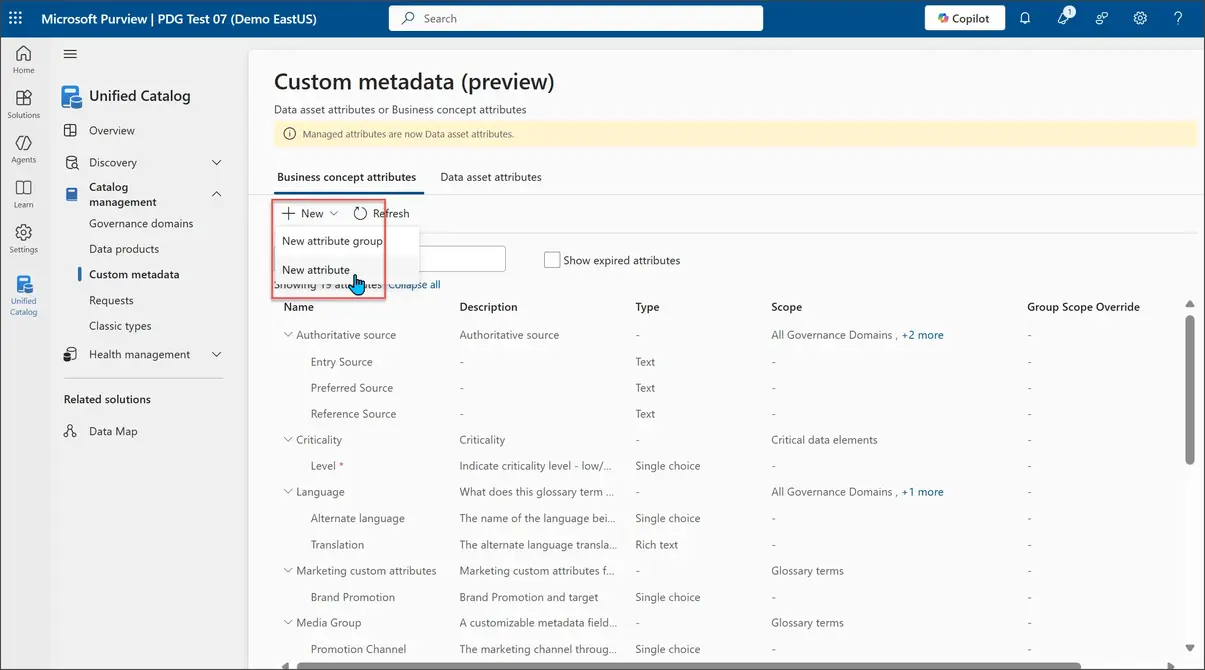
- You can also apply custom attribute filters (such as Equals or Starts with) to narrow down the list.
Step 3: Searching for Data Assets
If you need raw assets instead of curated products, you can search within Unified Catalog > Discovery > Data assets.
- Use the search bar to enter keywords, classifications, glossary terms, or asset names. Search results are ranked by relevance and highlight matched terms.
- Filters allow refinement by attributes such as asset type, classification, collection, contact, endorsement, tags, or update activity.
- Bulk editing is available to update glossary terms, classifications, or contacts across multiple assets.
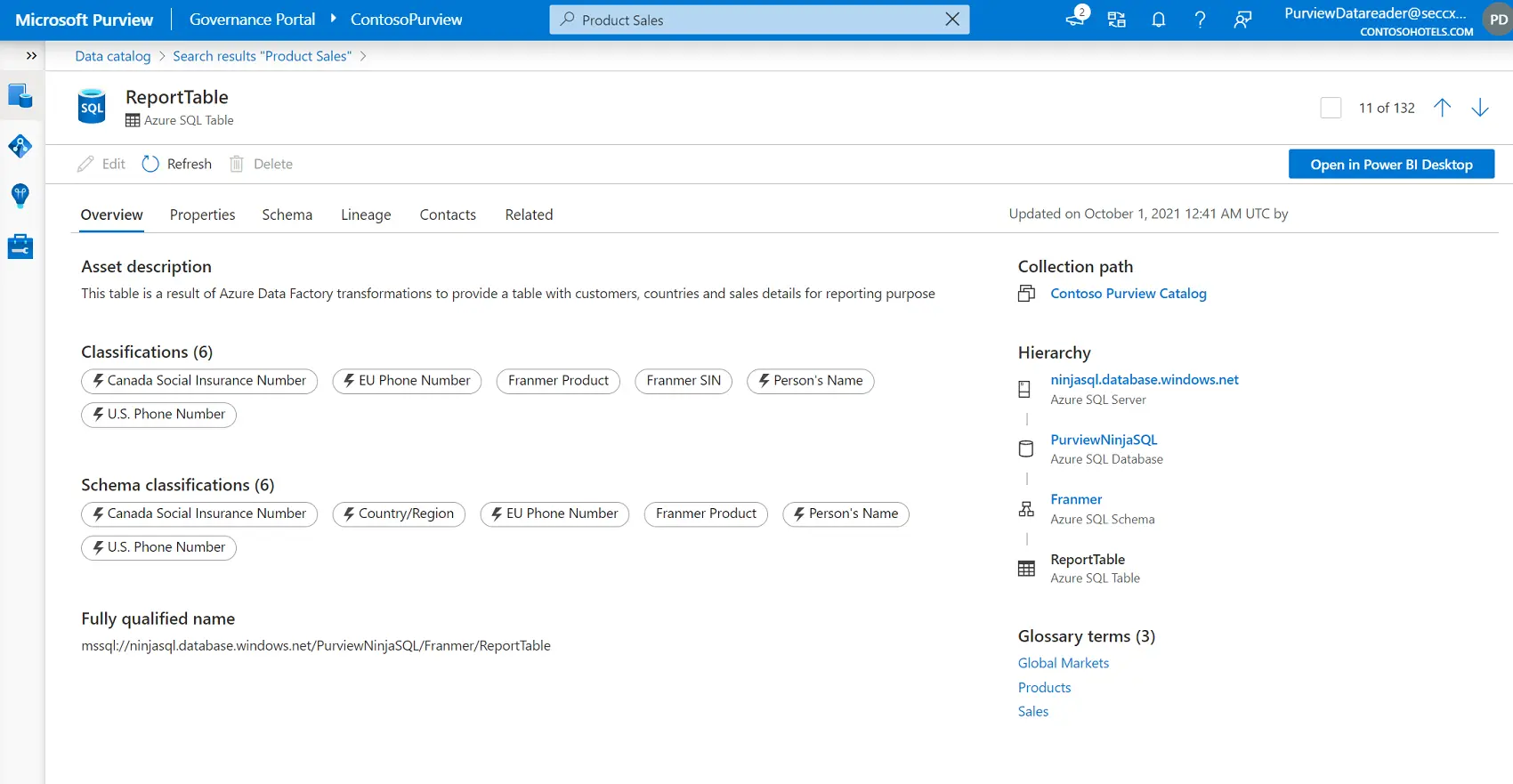
Selecting a data asset opens its details page, which includes description, schema, lineage, owner, and related products.
Step 4: Browsing Data Assets and Searching Connected Services
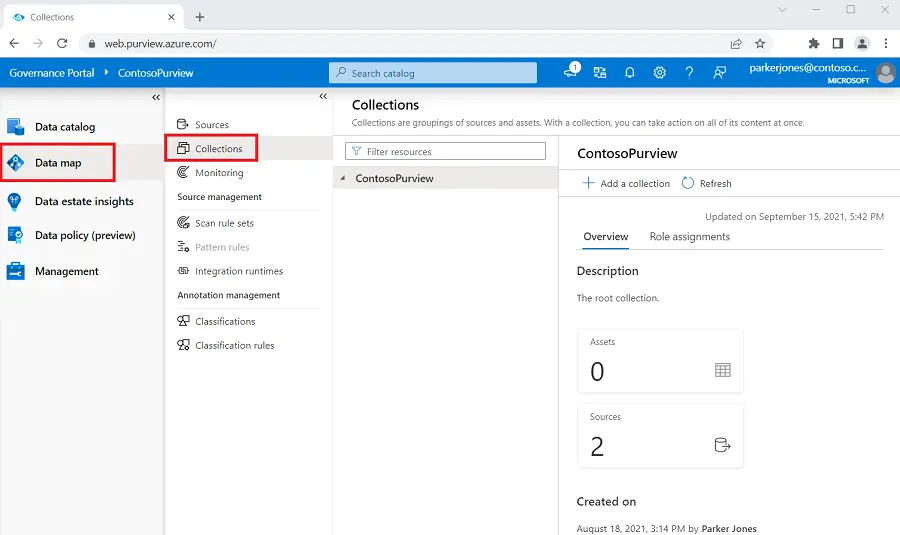
For exploratory work, you can browse data assets by collection or by the hierarchy of a registered data source. Only assets you have read access to are visible.
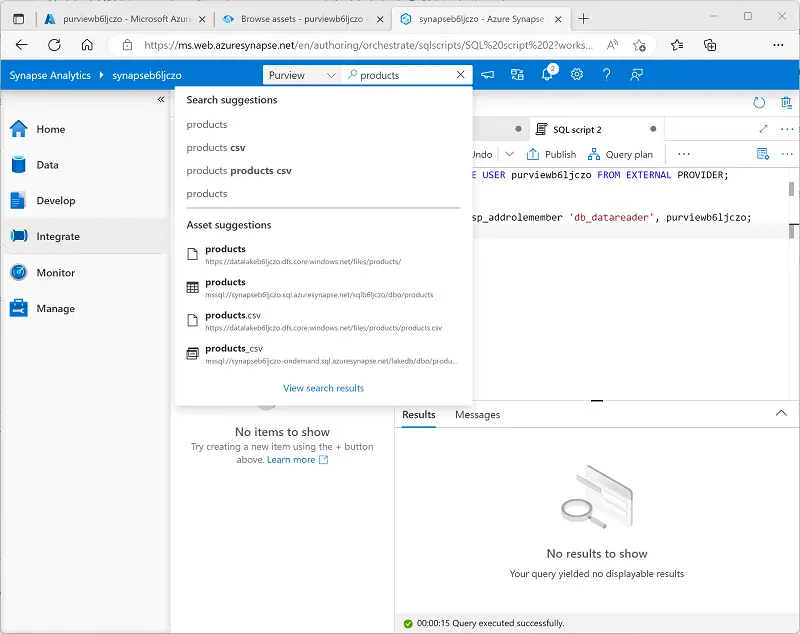
Once Purview is registered with tools like Azure Data Factory or Azure Synapse Analytics, you can run catalog searches directly from those services. This integration helps locate and use governed data while staying in your workflow.
Microsoft Purview Unified Catalog Best Practices
1. Build Effective Governance Domains
Governance domains are the backbone of Purview’s federated governance model. They distribute ownership and give users a way to navigate the catalog without being overwhelmed by the full data estate. A well-designed domain structure makes discovery easier, aligns responsibilities with business expertise, and reduces governance bottlenecks.
When defining domains, avoid structuring them around platforms or technologies. IT systems often reflect how applications are built, not how data is used by the business. Instead, center domains on business use, such as subject areas (e.g., finance, sales), functions (e.g., risk, operations), regulatory categories, or major projects. A mixed model that blends these perspectives provides durability as organizations change and scales better than single-approach structures.
Start small, selecting a few domains with strong existing stewardship. Assign stewards and product owners, and let them develop the first glossary terms and data products. Keep domains in draft until those products are mature, then publish them and open access to a small user group. Feedback from those early users helps refine scope, structure, and content before broader rollout.
2. Design Valuable Data Products
Data products turn raw assets into discoverable, governed, and reusable business-ready packages. Not every dataset warrants a product—focus first on high-value, trusted resources that already support decision-making. Examples include curated lake zones, high-quality SQL stores, enterprise warehouses, or reference datasets like customer master data. Reports and tables that business units regularly use to drive outcomes are also strong candidates.
Creating data products should be part of your intake process when onboarding new sources into the data map. Product owners need visibility into which assets are scanned and available, so they can quickly assess what should be grouped into products. Building from already-curated data accelerates adoption and demonstrates the benefits of the catalog early.
Each product should include clear descriptions, linked glossary terms, lineage, and data quality details. Publish only when the target audience is ready to use the product. This avoids “empty shelves” that erode trust and ensures early catalog users always find something meaningful.
3. Define and Maintain Glossary Terms
Glossary terms give shared meaning to data across domains. They connect technical fields to business language and enable consistent interpretation of metrics, reports, and assets. Without them, users struggle to understand what data actually represents.
Begin with terms already in use by the business. Many departments maintain glossaries for onboarding new employees or supporting compliance efforts. Bring these into Purview and expand them over time. If a term is ambiguous, add it anyway with a basic definition—publishing early allows stewards and users to refine it as understanding improves.
Map glossary terms directly to data products and assets. This strengthens discoverability, ensures consistent use of language, and creates a feedback loop: as users search by term, stewards can see which products rely on it and adjust definitions where needed. Regular reviews of term mappings help keep the glossary relevant and aligned to real usage.
4. Apply Custom Metadata Thoughtfully
Custom metadata extends Purview beyond its built-in attributes. It allows organizations to capture details that matter for their specific governance, compliance, or operational needs. Well-planned metadata structures improve navigation, filter precision, and governance automation.
Define attributes carefully. Overloading assets with unnecessary fields leads to inconsistency and wasted effort. Instead, focus on attributes that drive real business or governance outcomes—examples include regulatory classification, data lifecycle stage, sensitivity, or stewardship contact.
Standardize usage across domains. Ensure business concept types (e.g., governance domains, products) and data asset types share consistent attribute definitions. This helps stewards and consumers interpret metadata without confusion. Review attribute usage periodically and retire those that provide little value. Metadata should evolve alongside governance practices, not remain static.
5. Elevate Understanding with Critical Data Elements
Critical data elements (CDEs) capture the most important fields within a dataset—the ones that drive compliance, reporting accuracy, or core business processes. Documenting and governing them in Purview ensures high-value data is consistently understood, protected, and trusted.
Don’t attempt to classify every field as critical. Instead, focus on a small subset of elements that matter most for decision-making or regulatory reporting. For example, customer identifiers, financial balances, or product codes may need strict governance, while ancillary fields do not.
For each CDE, define ownership, expected meaning, quality rules, and access controls. Aligning these elements with glossary terms ensures consistency of business definitions. Apply data quality checks to validate values across systems, and monitor lineage to confirm how critical elements flow into reports and models.
Cross-domain review of CDEs is essential. Often, a critical field in one domain (e.g., customer ID in sales) underpins use cases in another (e.g., customer service or finance). By aligning definitions and controls, organizations reduce duplication and avoid misaligned interpretations.
Data Orchestration for Microsoft Purview Users with Dagster
Microsoft Purview provides governance, discovery, lineage, and access control for data across an organization. Dagster complements these capabilities by orchestrating the pipelines that create and update data assets. Together, they support a modern data architecture where high quality, well governed, and reliably produced data is available to consumers.
Dagster’s asset based development model aligns naturally with the way Purview organizes and catalogs information. Dagster assets represent tables, files, views, and other data outputs that Purview can register, scan, and classify. When Dagster materializes or updates these assets in systems such as Azure Data Lake Storage, Azure SQL Database, Azure Synapse, or Fabric Lakehouse, Purview can automatically discover them and capture metadata, lineage, and classifications.
Teams can also use Dagster to standardize transformations and enforce the operational quality that supports Purview governance. Examples include:
- Creating repeatable pipelines that feed trusted zones in a lake or warehouse
- Establishing clear ownership of upstream logic tied to assets Purview catalogs
- Surfacing data quality checks in Dagster that align with Purview classifications and domain expectations
- Coordinating schedules and dependencies that ensure cataloged assets stay fresh and reliable
Some teams choose to enhance this relationship further by emitting metadata, descriptions, or lineage details from Dagster into Azure services that Purview scans. This helps reinforce consistent context between operational pipelines and governed assets.
By combining the strengths of Dagster’s orchestration with Purview’s governance and discovery capabilities, organizations can deliver data that is both operationally dependable and fully aligned with enterprise standards. The result is a unified ecosystem where pipelines, metadata, asset quality, and governance reinforce each other and accelerate the creation of data products.