



Some of the most interesting Dagster projects come from the community. This post highlights creative community-built applications.
Some of our favorite Dagster use cases are the ones we never could have predicted.
People in the community are using Dagster to explore public datasets, monitor infrastructure, automate research workflows, build internal tools, and experiment with entirely new kinds of data applications. Some projects are deeply technical, some are wonderfully niche, and all of them reflect the creativity of the people building with Dagster.
This post highlights a few community-built projects that caught our attention along with the stories behind them, why their creators picked Dagster, and what the experience of building them was like.
Working on something fun with Dagster? We’d love to hear about it.
Edwin Weber

Tell us a little about yourself and what you work on
I am Edwin Weber, an independent data engineer based in The Netherlands. I strongly believe in metadata-driven data engineering automation and have developed those kinds of 'frameworks' frequently in my career. I am mainly active on the 'back-end' of data projects, extracting data from source systems, data modeling, writing transformations, managing orchestration, tuning SQL queries etc.
How did you first discover Dagster?
I first encountered Dagster when I read the book 'DuckDB in Action' by Manning Publications. The book mentioned Dagster as a tool for orchestrating data pipelines.
Then I chose to use dbt for my data transformations and read that Dagster has great integration with dbt, including discovering the dependencies automatically. This made the choice for my data orchestration tool clear: Dagster.
What project have you been building with Dagster?
I wanted a pet project to actually build something with the tools I kept reading about, what is often called The Modern Data Stack. I forked a project that resembled my setup (https://github.com/bgarcevic/danish-democracy-data) and added my own ideas to it.
The basic idea is: having a complete data engineering project for a small budget, using only open source tools and as little moving parts to maintain as possible. It is available here: https://github.com/edwinweber/dbt_duckdb_demo_public
The stack I used for this project is:
- Orchestration: Dagster
- IDE: Visual Studio Code
- Programming language: Python
- Data extraction: dlt
- Data transformation: dbt
- Data storage: DuckDB and Delta tables
- Compute: DuckDB
- Visualization: Metabase
- Infrastructure: Docker containers on local machine for development, on a Hetzner cloud server for 'production'.
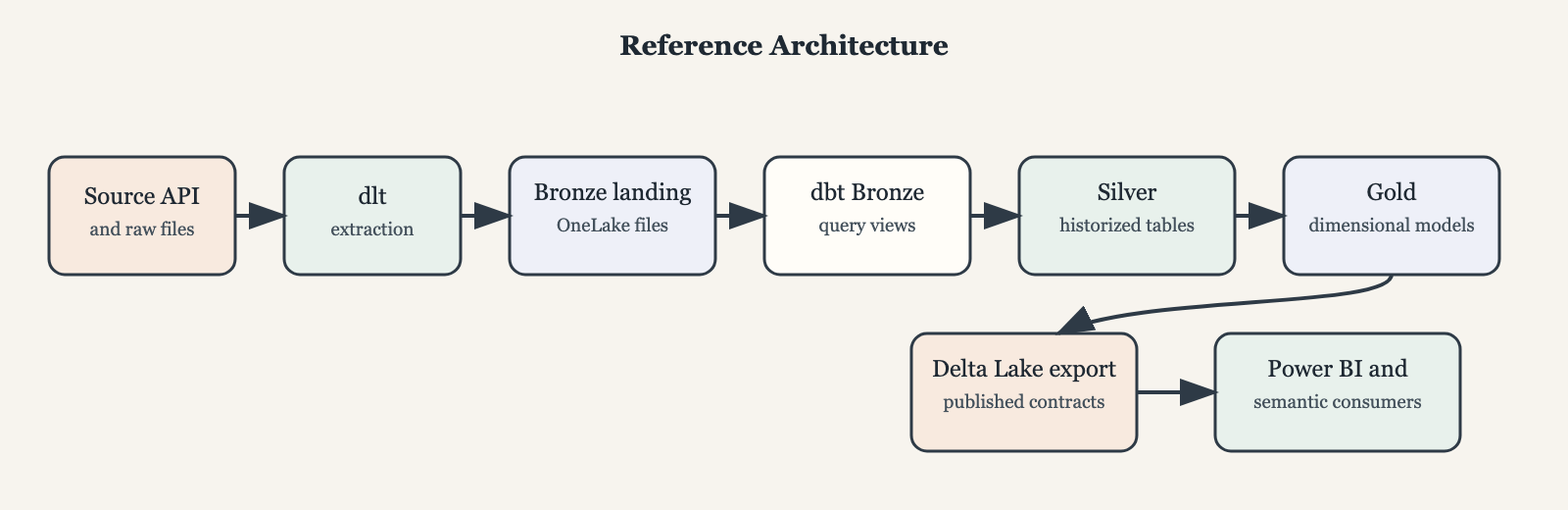
What does it do: Extracting data from a public API, transforming it with dbt and loading it into DuckDB and Delta tables. The data is about meetings and votes on subjects in the Danish parliament. The data follows a path through the medallion layers:
- Bronze (json data extracted fro the API with DuckDB views on it)
- Silver: fully historized data, derived via hash-based CDC detection. Available as tables in DuckDB and Delta tables in the chosen file storage (local or Microsoft Fabric Onelake)
- Gold: a dimensional model for analysis, available as views in DuckDB and Delta tables in the chosen file storage (local or Microsoft Fabric Onelake)
For visualization, I use Metabase, which connects to the DuckDB instance and allows me to create dashboards and explore the data about the parliament, but also the data from Dagster (the SQLite database where it stores the metadata about the runs, assets, materializations etc).
What was the hardest or most interesting problem you solved?
I had to stop the Metabase container when the dbt part of the project was running to avoid locking conflicts in DuckDB.
The solution was to create 2 Dagster assets, one to stop the Metabase container and one to start it again after the dbt part is done and adding those 'assets' automatically to every Dagster job. Assets are very generic things, not limited to processes for data.
@asset(
    name="stop_metabase_asset",
    description="Stops Metabase before pipeline runs."
)
def stop_metabase_asset():
    subprocess.run(["./stop_metabase_and_wait.sh"], check=True)


def build_start_metabase_asset(upstream_asset_keys: Iterable[AssetKey]) -> AssetsDefinition:
    unique_keys = sorted(set(upstream_asset_keys), key=lambda key: key.to_user_string())

    @asset(
        name="start_metabase_asset",
        deps=unique_keys,
        description="Starts Metabase after pipeline runs.",
    )
    def start_metabase_asset():
        subprocess.run(["./start_metabase_and_wait.sh"], check=True)

    return start_metabase_asset
Why was Dagster a good fit for this project?
Dagster was a great fit for my project. It is pure Python, integrated well with my dbt project and the UI is really nice to work with. I had no experience with Dagster at all, but I was able to get started really quickly and the documentation is really good.
What advice would you give someone starting with Dagster?
Read the documentation, follow some tutorials and just start building. If you also use dbt, make sure to use the dbt integration, so you do not have to define dependencies twice.
The UI is actually great. If you need even more runtime data in a 'DevOps'-dashboard, it is worth it to use the underlying SQLite database for reporting. I defined views in DuckDB on top of that database for that purpose.
Parag Ekbote
Linkedin | Github | Hugging Face

Tell us a little about yourself and what you work on
I'm currently in my final year of an undergraduate degree focused on Artificial Intelligence and Data Science. Alongside my studies. I'm also a Technical Reviewer for Manning Publications and as a guest speaker, which has given me the opportunity to work closely with technical content and stay current with emerging tools and best practices.
A lot of my work revolves around machine learning, data engineering, and the Hugging Face ecosystem. I enjoy building tools that make it easier for developers and researchers to work with data at scale. Open source has been a huge part of my journey because it allows me to learn from experienced contributors while building software that can have a real impact on the community.
How did you first discover Dagster?
I first discovered Dagster while working with Hugging Face Datasets. I was looking for ways to expand the reach and usability of datasets hosted on the Hugging Face Hub, and I realized that data orchestration could play an important role in making dataset ingestion, transformation and monitoring more reliable and reusable.
What initially attracted me to Dagster was its strong open-source community and exceptionally clear documentation. Since this was one of my first major experiences working with a dedicated data engineering and orchestration tool, having thorough guides and examples made a huge difference. As I explored further, I found that Dagster's asset-based approach aligned naturally with the way I was thinking about datasets and data pipelines. That alignment eventually led me from being a user to a contributor to help connect Hugging Face and Dagster more seamlessly.
What project have you been building with Dagster?
I built an open-source Python library that integrates Dagster with Hugging Face Datasets. The goal was to make it easy for users to load any dataset from the Hugging Face Hub, process it using Dagster, and then push the resulting dataset back to the Hub.
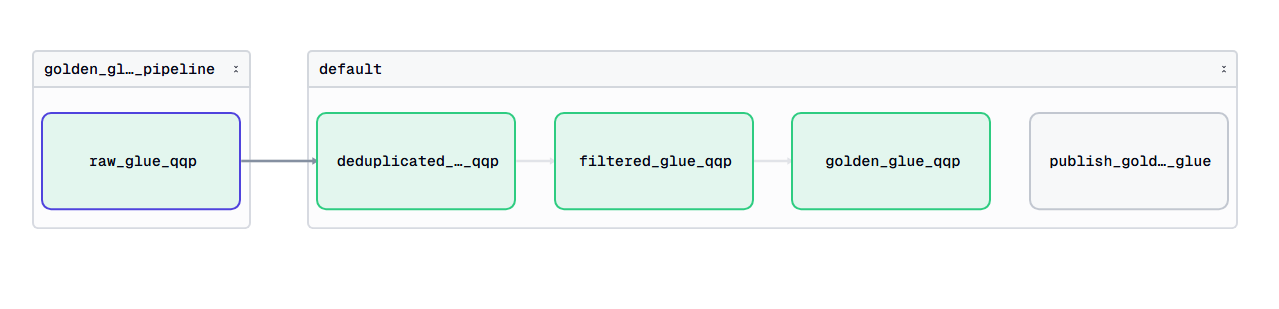
The implementation relied heavily on Dagster's asset system and decorators, allowing users to define dataset workflows with relatively little boilerplate. I iterated on the library extensively, continuously testing different dataset configurations and processing workflows until I was able to reliably handle datasets in the way users would expect. Throughout the process, I also received valuable feedback from members of the Dagster community, including Colton Padden, which helped improve both the usability and design of the integration.
What was the hardest or most interesting problem you solved?
One of the most challenging and interesting problems was adding streaming support to the library. Hugging Face datasets can be extremely large. Supporting those workflows required me to think carefully about how data would move through Dagster's execution model.
To make this work, I implemented a custom IO manager that could properly handle streamed datasets while still fitting within Dagster's asset architecture.
Another challenge was metadata management. Hugging Face datasets contain valuable metadata that users often want to preserve and publish alongside their processed datasets.
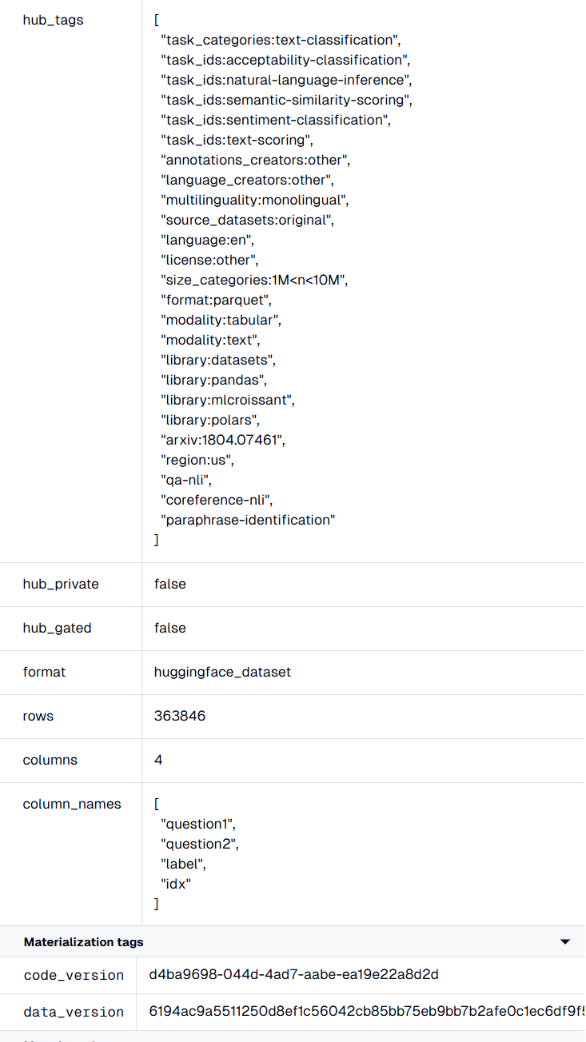
So, I developed a module that automatically extracts metadata from publicly available dataset information while also allowing users to define and attach their own custom metadata. This metadata can then be pushed back to the Hugging Face Hub along with the transformed dataset, creating a more complete and reproducible workflow.
Why was Dagster a good fit for this project?
Dagster was a great fit primarily because of its asset-based architecture. Hugging Face datasets naturally map to assets, so the mental model felt intuitive from the beginning. Instead of thinking about pipelines as a series of disconnected tasks, I could model datasets as first-class objects and focus on how they evolved throughout the workflow.
I also appreciated Dagster's ecosystem of integrations and its philosophy around extensibility. Many orchestration tools require users to manage external integrations themselves or maintain them separately from the core project. With Dagster, there is a strong ecosystem of maintained integrations and a community that actively supports new connectors and use cases.
What advice would you give someone starting with Dagster?
My biggest piece of advice is to start small and learn through building. After that, spend time with the documentation. Dagster has some of the clearest documentation and usage guides I've worked with, and many common questions are already covered with practical examples. Rather than trying to learn everything at once, start with a small project, experiment with assets, and gradually explore more advanced concepts.
I'd also encourage people to engage with the community. I received valuable feedback through the Hugging Face community, helping to shape the project significantly. Building with Dagster often feels much more productive than maintaining a collection of custom Python scripts.