
A practical guide to choosing between push, pull, and poll data ingestion patterns. With real Dagster code examples to help you build reliable, maintainable pipelines.
Ingestion Woes
First things are usually first. Often, the discourse around data engineering centers on high-performance tools and the latest AI benchmarks. However, when it comes to data engineering, getting your data to work is non-trivial and requires more engineering effort than you expect.
Most teams treat ingestion as an afterthought, building one-off solutions that don't scale. When a source changes its API, when a partner misses a delivery, when you need to backfill historical data, you're stuck debugging custom code instead of leveraging proven patterns.
Solving ingestion from source systems by hand rolling your own solution is a data engineering right of passage. You should try to do it at least once, and you will gain a greater appreciation for managed solutions like Fivetran and open-source ones like Sling and dlt.
Why Ingestion Patterns Matter
The Foundation of Everything
Data ingestion is the entry point for your entire data platform. Every downstream operation: transformation, modeling, analytics, machine learning, and AI depends on data arriving reliably, on time, and in the right format. Get ingestion wrong, and you're fighting fires downstream forever.
What makes it tricky is that you are often more beholden to systems that don't have analytics in mind. Data APIs that aren't idempotent, inconsistent authentication processes, and figuring out how deletes are handled. Because of this, you, as the data engineer, need to engineer solutions that work around these constraints to provide high-quality data to downstream processes.
The Three Fundamental Patterns
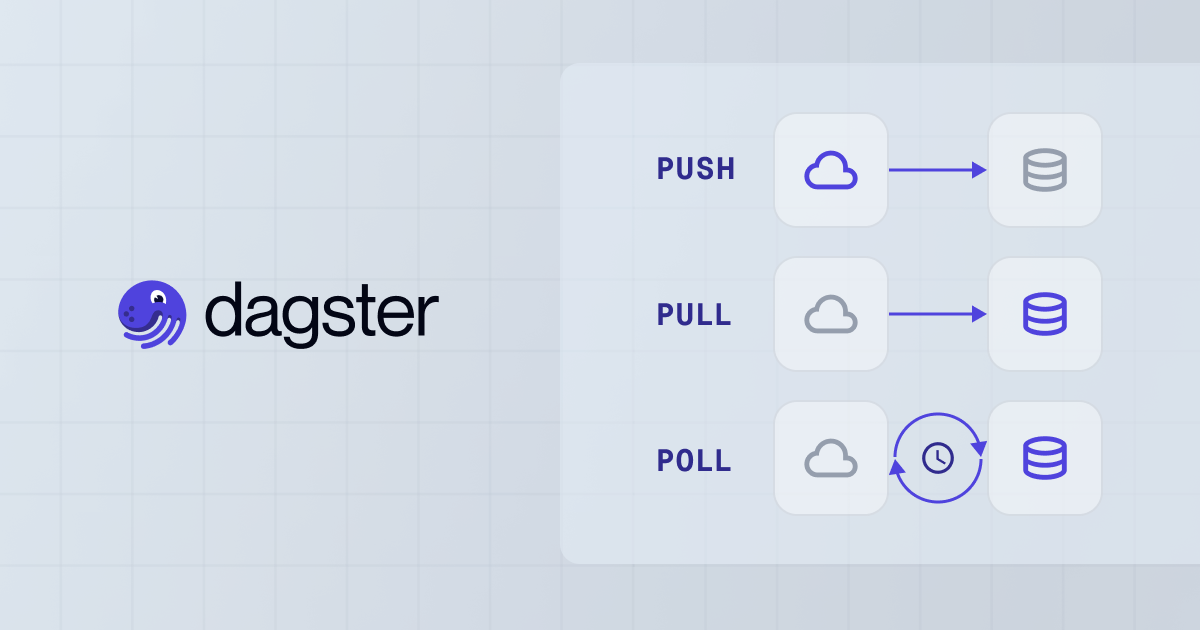
Most data ingestion approaches fall into three fundamental patterns: Push, Pull, and Poll. Each reflects a different approach to data flow, ownership, and operational responsibility. I created an example projec using these different methods here.
Push-based ingestion: The source system initiates the transfer. You're the passive receiver. This approach works well when you have contractual agreements with data providers, but it relinquishes control over timing and volume. The most common pattern is for a vendor to dump data into durable object storage, such as Amazon S3.
Pull-based ingestion: Your platform initiates the transfer. You control schedules, data windows, and backfills. This is the default for most data engineering teams, but it requires source systems to expose APIs or support queries.
Polling-based ingestion: You frequently check for new data, requesting only changes since the last check. This enables near real-time architectures but adds complexity around state management and duplicate handling.
Most of the time, the source system you are working with determines which pattern you are going to use
Why This Matters Now
Modern data platforms ingest from dozens of sources: SaaS tools, partner databases, internal applications, and streaming services. Without consistent patterns, you end up with:
- Inconsistent error handling: Some sources retry automatically, others fail silently
- No visibility: Different monitoring approaches for each source
- Maintenance burden: Custom code for every integration
- Data quality issues: Inconsistent validation and schema management
The right pattern, applied consistently, gives you reliability, observability, and maintainability. Having the wrong or no pattern can lead to technical debt and operational headaches.
Understanding Push, Pull, and Poll
Push-Based Ingestion
In push-based ingestion, the data producer initiates the transfer, sending data to your platform without an explicit request. The source system controls timing, volume, and format.
When to use push:
- You have contractual agreements with data providers
- Sources can deliver data via webhooks or direct API calls
- Real-time or near-real-time delivery is required
- You want to minimize compute costs (source pays for delivery)
Advantages:
- Immediate delivery when data is available
- Source system controls timing and cadence
- Lower compute costs (no polling overhead)
- Works well for event-driven architectures
Challenges:
- Less control over timing and volume
- Must handle bursts and spikes gracefully
- Schema drift from source changes
- Requires robust error handling and idempotency
Pull-Based Ingestion
Pull-based ingestion is controlled by your platform. You initiate the import process, requesting data from the source at regular intervals or on demand.
When to use pull:
- You need control over schedules and data windows
- Source systems provide APIs or support direct queries
- Historical backfills and retroactive corrections are common
- Data freshness requirements are predictable
Advantages:
- Full control over timing, volume, and scope
- Easy to implement backfills and replays
- Standardized scheduling and error handling
- Works well with batch processing architectures
Challenges:
- Must handle duplicate data if reprocessing
- Risk of missing records due to scheduling issues
- Requires explicit tracking of extracted data
- Source system must be queryable or expose APIs
Polling-Based Ingestion
Polling combines push and pull: you frequently check for new data, but request only changes or updates since the last check rather than entire datasets.
When to use polling:
- Near real-time or event-driven responsiveness is required
- Working with message queues (Kafka, Pulsar) or change data capture (CDC)
- Need precise control over data flow with low latency
- Source systems support incremental queries or event streams
Advantages:
- Responsive architectures with low end-to-end latency
- Precise control over data flow
- Efficient processing (only new data)
- Works well with streaming and event-driven architectures
Challenges:
- Must reliably record state (offsets, timestamps, markers)
- Handle missed or duplicate messages
- Manage variations in poll intervals or failures
- More complex than simple pull patterns
Practical Implementation: Building Ingestion Patterns with Dagster
Setting Up Push-Based Ingestion
Push-based ingestion in Dagster typically involves exposing an API endpoint that receives data from external sources. You'll utilize Dagster's resources to handle incoming requests and assets, processing the data accordingly.
from datetime import datetime
from typing import Any

import dagster as dg
import pandas as pd
from dagster_duckdb import DuckDBResource

from ingestion_patterns.resources import WebhookStorageResource


class WebhookPayloadConfig(dg.Config):
    """Configuration for webhook payload processing."""

    source_id: str = "default"
    validate_schema: bool = True


@dg.asset
def process_webhook_data(
    context: dg.AssetExecutionContext,
    config: WebhookPayloadConfig,
    duckdb: DuckDBResource,
    webhook_storage: WebhookStorageResource,
) -> dict[str, Any]:
    """Process data received via webhook push and store in DuckDB.

    This asset processes pending webhook payloads from storage,
    validates them, ensures idempotency, and stores in DuckDB.
    """
    # Retrieve pending payloads for this source using the resource
    pending = webhook_storage.get_pending_payloads(config.source_id)

    if not pending:
        context.log.info(f"No pending payloads for source: {config.source_id}")
        return {"processed": [], "count": 0, "duplicates": 0}

    context.log.info(f"Processing {len(pending)} pending payloads from {config.source_id}")

    processed = []
    duplicates = 0
    invalid = 0

    # Track processed IDs for idempotency
    seen_ids: set[str] = set()

    for payload in pending:
        # Validate required fields
        if config.validate_schema:
            if not _validate_payload_schema(payload):
                context.log.warning(f"Invalid payload schema: {payload.get('id', 'unknown')}")
                invalid += 1
                continue

        # Idempotency check: skip if we've already processed this ID
        payload_id = payload.get("id")
        if payload_id is None:
            context.log.warning("Payload missing ID field")
            invalid += 1
            continue

        if payload_id in seen_ids:
            context.log.warning(f"Duplicate payload ID: {payload_id}")
            duplicates += 1
            continue

        seen_ids.add(str(payload_id))

        # Process the payload
        processed_item = {
            "id": payload_id,
            "source": config.source_id,
            "timestamp": payload.get("timestamp"),
            "data": str(payload.get("data", {})),  # Convert dict to string for DuckDB
            "processed_at": datetime.now().isoformat(),
            "run_id": context.run.run_id,
        }

        processed.append(processed_item)

    # Clear processed payloads from storage using the resource
    webhook_storage.clear_payloads(config.source_id)

    # Store processed payloads in DuckDB
    total_count = 0
    if processed:
        webhook_df = pd.DataFrame(processed)
        with duckdb.get_connection() as conn:
            conn.execute("CREATE SCHEMA IF NOT EXISTS ingestion")
            conn.register("webhook_df", webhook_df)
            # Check if table exists
            table_exists = conn.execute(
                "SELECT 1 FROM information_schema.tables "
                "WHERE table_schema='ingestion' AND table_name='webhook_data'"
            ).fetchone()
            if table_exists:
                conn.execute("INSERT INTO ingestion.webhook_data SELECT * FROM webhook_df")
            else:
                conn.execute("CREATE TABLE ingestion.webhook_data AS SELECT * FROM webhook_df")

            result = conn.execute("SELECT COUNT(*) FROM ingestion.webhook_data").fetchone()
            total_count = result[0] if result else 0
        context.log.info(f"Stored {len(processed)} payloads in ingestion.webhook_data")

    context.log.info(
        f"Processed {len(processed)} payloads, {duplicates} duplicates, {invalid} invalid"
    )

    context.add_output_metadata(
        {
            "processed_count": len(processed),
            "total_in_storage": total_count,
            "duplicates": duplicates,
            "invalid": invalid,
        }
    )

    return {
        "processed": processed,
        "count": len(processed),
        "duplicates": duplicates,
        "invalid": invalid,
    }


def _validate_payload_schema(payload: dict[str, Any]) -> bool:
    """Validate that payload has required schema fields."""
    required_fields = ["id", "timestamp", "data"]
    return all(field in payload for field in required_fields)
Key considerations:
- Implement idempotency using unique identifiers from source
- Use queues or storage buffers to handle bursts
- Validate schema and data quality at ingestion time
- Log all incoming payloads for observability
Setting Up Pull-Based Ingestion
Pull-based ingestion gives you full control. You schedule assets to run at specific intervals, query source systems, and track what you've already processed.
from datetime import datetime, timedelta
from typing import Any

import dagster as dg
import pandas as pd
from dagster._core.events import StepMaterializationData
from dagster_duckdb import DuckDBResource

from ingestion_patterns.resources import APIClientResource


class PullIngestionConfig(dg.Config):
    """Configuration for pull-based ingestion."""

    start_date: str | None = None  # ISO format
    end_date: str | None = None  # ISO format
    batch_size: int = 1000


@dg.asset
def extract_source_data(
    context: dg.AssetExecutionContext,
    config: PullIngestionConfig,
    duckdb: DuckDBResource,
    api_client: APIClientResource,
) -> pd.DataFrame:
    """Pull data from source system via API.

    This asset determines the date range to extract (defaulting to last 24 hours
    or using provided dates), queries the API, and returns a DataFrame.
    """
    # Determine date range
    end_date = datetime.now()

    # Try to get last successful extraction time from previous run
    last_event = context.instance.get_latest_materialization_event(context.asset_key)

    if last_event and last_event.dagster_event and not config.start_date:
        # Use last successful extraction time as start
        mat_data = last_event.dagster_event.event_specific_data
        if isinstance(mat_data, StepMaterializationData):
            metadata = mat_data.materialization.metadata
            if "last_extracted_timestamp" in metadata:
                timestamp_value = metadata["last_extracted_timestamp"].value
                start_date = datetime.fromisoformat(str(timestamp_value))
            else:
                start_date = end_date - timedelta(days=1)
        else:
            start_date = end_date - timedelta(days=1)
    elif config.start_date:
        start_date = datetime.fromisoformat(config.start_date)
    else:
        start_date = end_date - timedelta(days=1)

    if config.end_date:
        end_date = datetime.fromisoformat(config.end_date)

    context.log.info(f"Pulling data from {start_date} to {end_date}")

    # Pull data from API using the resource
    records = api_client.get_records(start_date, end_date)

    if not records:
        context.log.info("No new records found")
        return pd.DataFrame()

    df = pd.DataFrame(records)

    # Store raw data in DuckDB
    with duckdb.get_connection() as conn:
        conn.execute("CREATE SCHEMA IF NOT EXISTS ingestion")
        conn.register("raw_df", df)
        # Check if table exists
        table_exists = conn.execute(
            "SELECT 1 FROM information_schema.tables "
            "WHERE table_schema='ingestion' AND table_name='raw_extract'"
        ).fetchone()
        if table_exists:
            conn.execute("INSERT INTO ingestion.raw_extract SELECT * FROM raw_df")
        else:
            conn.execute("CREATE TABLE ingestion.raw_extract AS SELECT * FROM raw_df")
        context.log.info(f"Stored {len(df)} records in ingestion.raw_extract")

    # Store metadata for next run
    context.add_output_metadata(
        {
            "record_count": len(df),
            "start_date": start_date.isoformat(),
            "end_date": end_date.isoformat(),
            "last_extracted_timestamp": end_date.isoformat(),
        }
    )

    context.log.info(f"Extracted {len(df)} records")
    return df


@dg.asset_check(asset=extract_source_data)
def validate_extracted_data(
    context: dg.AssetCheckExecutionContext,
    extract_source_data: pd.DataFrame,
) -> dg.AssetCheckResult:
    """Validate extracted data quality.

    This asset check performs data quality checks:
    - Schema validation (required columns present)
    - Duplicate detection
    - Data type validation
    - Completeness checks (no nulls in required fields)
    """
    if extract_source_data.empty:
        return dg.AssetCheckResult(
            passed=True,
            metadata={"reason": "No data to validate"},
        )

    df = extract_source_data

    # Check required columns
    required_columns = ["id", "timestamp", "value"]
    missing = [col for col in required_columns if col not in df.columns]
    if missing:
        return dg.AssetCheckResult(
            passed=False,
            metadata={"missing_columns": missing},
            description=f"Missing required columns: {missing}",
        )

    # Check for duplicates
    duplicates = df.duplicated(subset=["id"])
    duplicate_count = int(duplicates.sum()) if duplicates.any() else 0

    # Check for nulls in required fields
    null_counts = df[required_columns].isnull().sum().to_dict()
    has_nulls = any(count > 0 for count in null_counts.values())

    # Determine pass/fail
    # We pass if there are no missing columns (duplicates and nulls are warnings)
    passed = len(missing) == 0

    return dg.AssetCheckResult(
        passed=passed,
        metadata={
            "record_count": len(df),
            "duplicate_count": duplicate_count,
            "null_counts": null_counts,
            "has_nulls": has_nulls,
        },
        description=(
            f"Validated {len(df)} records. Duplicates: {duplicate_count}, Has nulls: {has_nulls}"
        ),
    )


@dg.asset
def load_to_storage(
    context: dg.AssetExecutionContext,
    extract_source_data: pd.DataFrame,
    duckdb: DuckDBResource,
) -> dict[str, Any]:
    """Load extracted data to final storage table in DuckDB.

    This asset loads data after extraction. The validate_extracted_data
    asset check runs alongside to verify data quality.
    """
    if extract_source_data.empty:
        context.log.info("No data to load")
        return {"loaded": 0}

    df = extract_source_data

    # Clean data before loading: remove duplicates
    original_count = len(df)
    df = df.drop_duplicates(subset=["id"], keep="first")
    duplicates_removed = original_count - len(df)
    if duplicates_removed > 0:
        context.log.info(f"Removed {duplicates_removed} duplicate records")

    # Load to final table in DuckDB
    with duckdb.get_connection() as conn:
        conn.execute("CREATE SCHEMA IF NOT EXISTS ingestion")
        conn.register("final_df", df)
        # Check if table exists
        table_exists = conn.execute(
            "SELECT 1 FROM information_schema.tables "
            "WHERE table_schema='ingestion' AND table_name='final_data'"
        ).fetchone()
        if table_exists:
            conn.execute("INSERT INTO ingestion.final_data SELECT * FROM final_df")
        else:
            conn.execute("CREATE TABLE ingestion.final_data AS SELECT * FROM final_df")

        # Get total count
        result = conn.execute("SELECT COUNT(*) FROM ingestion.final_data").fetchone()
        total_count = result[0] if result else 0

    context.log.info(f"Loaded {len(df)} records to ingestion.final_data")

    context.add_output_metadata(
        {
            "loaded_count": len(df),
            "duplicates_removed": duplicates_removed,
            "total_in_storage": total_count,
            "load_timestamp": datetime.now().isoformat(),
        }
    )

    return {
        "loaded": len(df),
        "total": total_count,
        "timestamp": datetime.now().isoformat(),
    }
Key considerations:
- Track last processed timestamp or ID to avoid duplicates
- Implement incremental extraction when possible
- Handle API rate limits and retries
- Use Dagster's scheduling for predictable cadence
Setting Up Polling-Based Ingestion
Polling requires maintaining state between runs. You'll track offsets, timestamps, or unique markers to ensure you only process new data.
import json
from datetime import datetime
from typing import Any

import dagster as dg
import pandas as pd
from dagster._core.events import StepMaterializationData
from dagster_duckdb import DuckDBResource

from ingestion_patterns.resources import KafkaConsumerResource


class PollingConfig(dg.Config):
    """Configuration for polling-based ingestion."""

    kafka_topic: str = "transactions"
    poll_interval_seconds: int = 60
    max_records_per_poll: int = 100


@dg.asset
def poll_kafka_events(
    context: dg.AssetExecutionContext,
    config: PollingConfig,
    kafka_consumer: KafkaConsumerResource,
) -> dict[str, Any]:
    """Poll Kafka topic for new events since last checkpoint.

    This asset maintains state (last processed offset) and only processes
    new messages, ensuring idempotency and efficiency.
    """
    # Load last processed offset from previous materialization
    last_event = context.instance.get_latest_materialization_event(context.asset_key)

    start_offset = 0
    if last_event and last_event.dagster_event:
        # Extract offset from last materialization metadata
        mat_data = last_event.dagster_event.event_specific_data
        if isinstance(mat_data, StepMaterializationData):
            metadata = mat_data.materialization.metadata
            if "last_offset" in metadata:
                offset_value = metadata["last_offset"].value
                start_offset = int(str(offset_value)) + 1

    context.log.info(f"Polling from offset {start_offset}")

    # Poll for messages using the resource
    messages = kafka_consumer.poll_messages(
        topic=config.kafka_topic,
        timeout_seconds=config.poll_interval_seconds,
        max_records=config.max_records_per_poll,
        context=context,
    )

    if not messages:
        context.log.info("No new messages")
        return {
            "messages": [],
            "last_offset": start_offset - 1,
            "count": 0,
        }

    # Parse and validate messages
    parsed_messages = []
    seen_event_ids: set[str] = set()  # For idempotency

    for msg in messages:
        # Exception handling acceptable here: json.loads API uses exceptions for
        # invalid JSON (no way to LBYL check JSON validity without parsing)
        try:
            value = json.loads(msg["value"])
        except json.JSONDecodeError as e:
            context.log.warning(f"Failed to parse message at offset {msg['offset']}: {e}")
            continue

        event_id = value.get("event_id")

        # Idempotency check: skip if weve seen this event ID
        if event_id in seen_event_ids:
            context.log.warning(f"Duplicate event ID: {event_id}")
            continue

        seen_event_ids.add(event_id)

        parsed_messages.append(
            {
                "offset": msg["offset"],
                "partition": msg["partition"],
                "event_id": event_id,
                "event_type": value.get("event_type"),
                "data": value,
                "kafka_timestamp": msg["timestamp"],
            }
        )

    last_processed_offset = messages[-1]["offset"]

    context.log.info(
        f"Processed {len(parsed_messages)} messages, last offset: {last_processed_offset}"
    )

    # Store metadata for next run
    context.add_output_metadata(
        {
            "message_count": len(parsed_messages),
            "last_offset": last_processed_offset,
            "start_offset": start_offset,
            "poll_timestamp": datetime.now().isoformat(),
        }
    )

    return {
        "messages": parsed_messages,
        "last_offset": last_processed_offset,
        "count": len(parsed_messages),
    }


@dg.asset
def process_kafka_events(
    context: dg.AssetExecutionContext,
    poll_kafka_events: dict[str, Any],
    duckdb: DuckDBResource,
) -> dict[str, Any]:
    """Process polled Kafka events and store in DuckDB.

    This asset takes the polled messages and processes them,
    applying business logic and validation, then stores in DuckDB.
    """
    messages = poll_kafka_events.get("messages", [])

    if not messages:
        context.log.info("No messages to process")
        return {"processed": [], "count": 0}

    processed = []
    errors = []

    for msg in messages:
        # LBYL: Validate required fields exist before processing
        if "data" not in msg:
            context.log.error(f"Event {msg.get('event_id')} missing 'data' field")
            errors.append(
                {
                    "event_id": msg.get("event_id"),
                    "error": "Missing 'data' field",
                    "offset": msg.get("offset"),
                }
            )
            continue

        event_data = msg["data"]

        # LBYL: Validate transaction amount before processing
        amount = event_data.get("amount", 0)
        if amount < 0:
            context.log.error(f"Event {msg.get('event_id')} has invalid amount: {amount}")
            errors.append(
                {
                    "event_id": msg.get("event_id"),
                    "error": f"Invalid amount: {amount}",
                    "offset": msg.get("offset"),
                }
            )
            continue

        processed_item = {
            "event_id": msg["event_id"],
            "event_type": msg["event_type"],
            "amount": amount,
            "processed_at": datetime.now().isoformat(),
            "kafka_offset": msg["offset"],
        }

        processed.append(processed_item)

    # Store processed events in DuckDB
    if processed:
        events_df = pd.DataFrame(processed)
        with duckdb.get_connection() as conn:
            conn.execute("CREATE SCHEMA IF NOT EXISTS ingestion")
            conn.register("events_df", events_df)
            # Check if table exists
            table_exists = conn.execute(
                "SELECT 1 FROM information_schema.tables "
                "WHERE table_schema='ingestion' AND table_name='kafka_events'"
            ).fetchone()
            if table_exists:
                conn.execute("INSERT INTO ingestion.kafka_events SELECT * FROM events_df")
            else:
                conn.execute("CREATE TABLE ingestion.kafka_events AS SELECT * FROM events_df")

            result = conn.execute("SELECT COUNT(*) FROM ingestion.kafka_events").fetchone()
            total_count = result[0] if result else 0
        context.log.info(f"Stored {len(processed)} events in ingestion.kafka_events")
    else:
        total_count = 0

    context.log.info(f"Processed {len(processed)} events, {len(errors)} errors")

    context.add_output_metadata(
        {
            "processed_count": len(processed),
            "total_in_storage": total_count,
            "error_count": len(errors),
            "errors": errors if errors else None,
        }
    )

    return {
        "processed": processed,
        "count": len(processed),
        "errors": errors,
    }
Key considerations:
- Maintain state reliably (offsets, timestamps, markers)
- Handle duplicate messages gracefully
- Implement idempotency at the message level
- Use sensors for responsive polling intervals
Choosing the Right Pattern
When to Use Push
Choose push when:
- Source systems can deliver data proactively (webhooks, direct API calls)
- You have contractual agreements with data providers
- Real-time or near real-time delivery is required
- You want to minimize compute costs (source pays for delivery)
Trade-offs: Less control over timing, must handle bursts, requires robust error handling.
When to Use Pull
Choose pull when:
- You need full control over schedules and data windows
- Source systems provide APIs or support direct queries
- Historical backfills and retroactive corrections are common
- Data freshness requirements are predictable
Trade-offs: Must handle duplicates, risk of missing records, requires explicit tracking.
When to Use Poll
Choose poll when:
- Near real-time or event-driven responsiveness is required
- Working with message queues or change data capture
- Need precise control over data flow with low latency
- Source systems support incremental queries or event streams
Trade-offs: More complex state management, must handle duplicates, requires reliable checkpointing.
Hybrid Approaches
Most production systems use multiple patterns:
- Push for real-time events: Webhooks, streaming data
- Pull for batch processing: Scheduled extracts, API polling
- Poll for event streams: Kafka, CDC, message queues
The key is consistency: use the same error handling, observability, and idempotency patterns across all approaches.
Best Practices
Idempotency: The Foundation of Reliable Ingestion
Idempotency is one of those words you see written down but never said. Anyway, it's the guarantee that processing the same input multiple times yields identical results is essential regardless of the ingestion pattern. Without it, retries, out-of-order delivery, or operator-initiated reprocessing can corrupt downstream data.
How to implement:
- Track natural or synthetic keys (transaction IDs, timestamps)
- Use window boundaries for batch processing
- Implement deduplication logic that excludes already-processed records
- Test idempotency explicitly: run the same ingestion twice and verify identical results
Common pitfall: Assuming your source system guarantees uniqueness. Always implement idempotency at the ingestion layer, even if the source claims to be idempotent.
Schema Management
Schema drift is the unexpected format changes from source systems that breaks downstream pipelines. Proactive schema management and data quality checks minimize the disruption.
How to implement:
- Validate schemas at ingestion time
- Use schema registries for contract enforcement
- Log schema changes and alert on unexpected modifications
- Version your schemas and handle migrations gracefully
Common pitfall: Assuming schemas never change. They always do, especially with external sources.
Observability and Monitoring
You can't fix what you can't see. Detailed logging, metric tracking, and failure alerting should cover all ingestion stages.
What to monitor:
- Ingestion volume and latency
- Error rates and failure modes
- Schema validation failures
- Duplicate detection rates
- Source system availability
Common pitfall: Only monitoring success/failure. Monitor data quality, latency, and volume trends to catch issues before they become problems.
Error Handling and Recovery
Ingestion failures are inevitable. Design for graceful degradation and easy recovery.
How to implement:
- Implement exponential backoff for retries
- Use dead-letter queues for unprocessable messages
- Support manual backfills and replays
- Log all failures with sufficient context for debugging
Common pitfall: Failing silently or losing data on errors. Always log failures and provide recovery mechanisms to address them.
Building Reliable Ingestion
Data ingestion patterns ultimately shape your operational model, your ability to scale, and your team's quality of life. Push, pull, and poll each have their place, and the best platforms use all three strategically.
The pattern you choose determines how much complexity you own versus how much you push to source systems. But regardless of pattern, the fundamentals remain: idempotency, schema management, observability, and error handling.
Some (most) of the time, the ROI just doesn’t work to build and maintain your own ingestion pipelines. Developing your own ingestion pipelines is a valuable engineering exercise, and everyone should have the opportunity to do it at least once. After that, though, you are taking time away from doing high-value engineering work, since the raw data in your data platform has to go through at least a few steps before being useful. That's why we would recommend that you check out managed solutions like Fivetran and Airbyte and open source solutions like dlt and sling. We use a mix of approaches in our internal data platform.