
What Is Apache Airflow API?
Apache Airflow API is a programmatic interface provided by Apache Airflow, an open-source platform used to author, schedule, and monitor workflows (DAGs). Through its API, Airflow exposes endpoints that let users manage, trigger, and inspect DAGs, tasks, and other system components over HTTP. This API enables integration with external systems, automation scripts, monitoring tools, and CI/CD pipelines.
The Airflow API supports both a stable REST API (from version 2.x onward) and a legacy experimental API (available in earlier versions). The stable REST API follows the OpenAPI specification, which provides documentation, client code generation, and predictable request/response formats.
Get the Apache Airflow API documentation here.
Key Aspects of the Apache Airflow API
Core Resources
The Apache Airflow API is organized around resources, which represent distinct entities in the Airflow system. These resources are primarily managed through HTTP endpoints that are grouped by their type. Examples of resources include dagRuns, tasks, dags, and connections.
Resource names are typically plural and expressed in camelCase (e.g., dagRuns, taskInstances). These names are consistent throughout Airflow, appearing in URLs, API parameters, and responses. The API allows users to interact with these resources via standard HTTP methods like GET, POST, PATCH, and DELETE.
The structure of a resource's metadata is consistent across most objects, containing fields like name, description, and other relevant attributes. The exact fields can vary depending on the type of resource, and they are expressed in snake_case (e.g., created_at, last_modified).
Endpoint Structure
Airflow's API endpoints follow a clear and consistent structure. The base URL for API requests typically begins with /api/v2/, followed by the specific resource name. Each resource has several possible operations (e.g., listing, creating, updating, deleting) defined by different HTTP methods.
For example:
GET /api/v2/dags— Retrieves a list of DAGs.POST /api/v2/dags/{dag_id}/dagRuns— Creates a new DAG run.PATCH /api/v2/dags/{dag_id}/dagRuns/{dag_run_id}/ taskInstances/{task_id}/{map_index}— Updates the specified task in a DAG.
The API also supports query parameters to refine requests. Common parameters include limit, offset, and filtering criteria (e.g., state, execution_date).
CRUD Operations
The Airflow API supports Create, Read, Update, and Delete (CRUD) operations on most resources:
- Create (POST): To create a new resource, send a POST request with the resource's metadata in the body. A successful request returns a 201 status code and the resource's metadata.
- Read (GET): To retrieve resource details, send a GET request with the resource ID as a parameter. If no ID is provided, the request returns a list of resources. The response will include the resource metadata.
- Update (PATCH): Updates to a resource can be performed using the PATCH method, where only the fields specified in the request body are updated. This is often accompanied by the
update_maskparameter, indicating which fields should be modified. - Delete (DELETE): To delete a resource, a DELETE request with the resource ID is sent. A successful deletion returns a 204 status code with no content.
These operations support additional features such as pagination for listing resources and partial updates using the update_mask query parameter.
Query Parameters
Airflow's API supports various query parameters to refine API calls. Some common query parameters include:
- limit: Specifies the maximum number of objects to fetch in a list. The default is typically 25.
- offset: Defines the offset to start returning objects after a specified number, useful for pagination.
Example query:
GET /api/v2/connections?limit=25&offset=50
These query parameters allow users to control the size of responses and navigate through large datasets in a structured manner.
Authentication and Authorization
The Airflow API supports multiple authentication methods, ensuring that only authorized users can interact with the system. The default authentication backend is basic authentication, but it can be customized to integrate with other authentication systems (e.g., LDAP, OAuth). The authentication method used must be configured within Airflow’s settings.
When interacting with the API, users must provide valid credentials. If authentication fails, the API will respond with a 401 Unauthorized status code. Additionally, the system employs role-based access controls (RBAC) to ensure users can only access resources they have permission to.
Using the Apache Airflow API in MWAA
Amazon Managed Workflows for Apache Airflow (MWAA) provides a managed environment for running Airflow, and it includes support for the stable REST API. The API in MWAA works the same way as in self-managed Airflow, but access is restricted to ensure security and integration with AWS services.
To call the Airflow API in MWAA, you must send requests through the MWAA environment’s web server endpoint. This endpoint is private to your VPC by default, but it can be configured for public access if required. Since the endpoint is fronted by AWS Identity and Access Management (IAM), API requests must be signed with AWS Signature Version 4. This ensures that only authorized IAM users, roles, or services can interact with the Airflow environment.
Typical steps for using the API in MWAA are:
- Obtain the MWAA web server URL from the AWS console or CLI.
- Sign API requests using AWS SigV4. You can use tools like
aws-sigv4-proxy, the AWS SDK, or therequests-aws4authlibrary in Python. - Send requests to the Airflow API endpoints under
/api/v2/, the same as in standard Airflow (e.g.,/api/v2/dags,/api/v2/dags/{dag_id}/dagRuns).
Because authentication is IAM-based, you don’t use Airflow’s basic auth or RBAC accounts directly. Instead, IAM permissions determine who can call the API, while Airflow’s RBAC still controls what actions a user can perform once inside the system.
This setup allows you to integrate MWAA with CI/CD pipelines, AWS Lambda, or external workflow orchestrators without exposing static credentials. It also ensures that API access follows the same security model as the rest of your AWS infrastructure.
Tutorial: Working with Airflow Taskflow API
The Taskflow API, introduced in Airflow 2.0, simplifies DAG creation by allowing tasks to be defined as standard Python functions. This abstraction reduces boilerplate code, manages XComs automatically, and makes the DAG definition more readable and Pythonic.
The tutorial instructions below are adapted from the Airflow documentation.
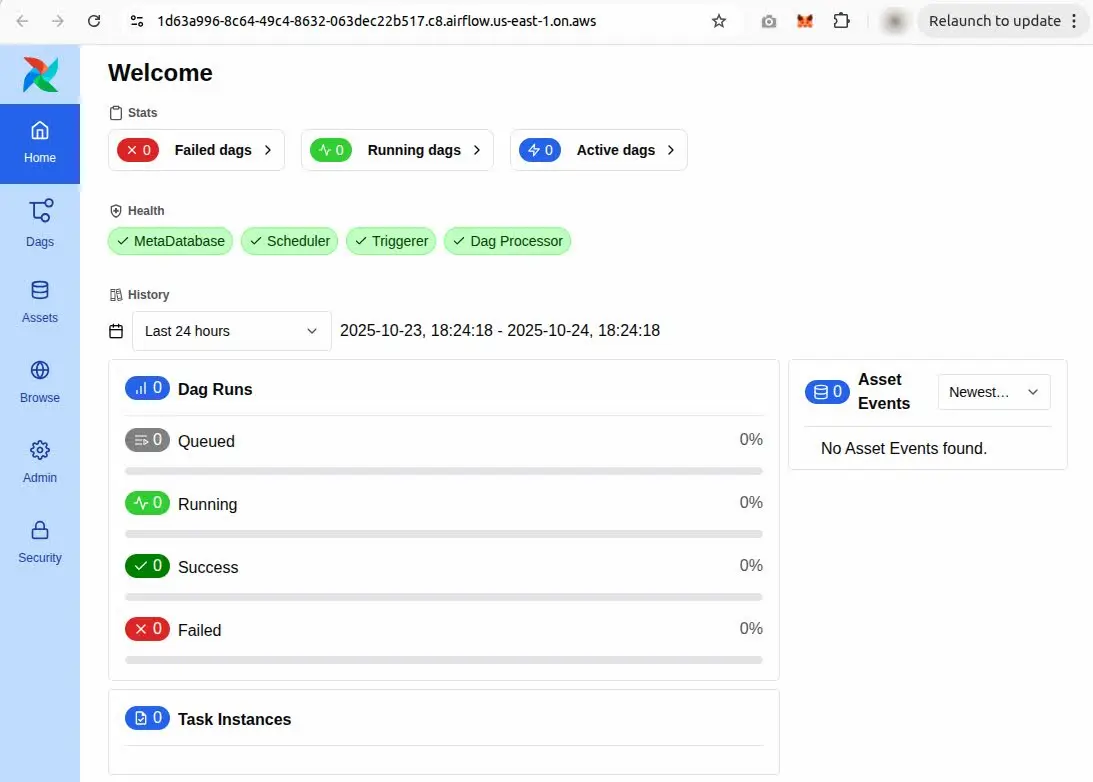
Note: Ensure your AWS Airflow UI is up and running.
Defining a DAG with the Taskflow API
To use the Taskflow API, decorate your DAG function with @dag() and your task functions with @task(). For example, a simple ETL workflow can be built as follows:
@dag(default_args=default_args, schedule_interval=None, start_date=days_ago(2), tags=['example'])
def tutorial_taskflow_api_etl():
@task()
def extract():
data_string = '{"1001": 301.27, "1002": 433.21, "1003": 502.22}'
return json.loads(data_string)
@task(multiple_outputs=True)
def transform(order_data_dict):
total = sum(order_data_dict.values())
return {"total_order_value": total}
@task()
def load(total_order_value):
print(f"Total order value is: {total_order_value:.2f}")
order_data = extract()
order_summary = transform(order_data)
load(order_summary["total_order_value"])
tutorial_etl_dag = tutorial_taskflow_api_etl()
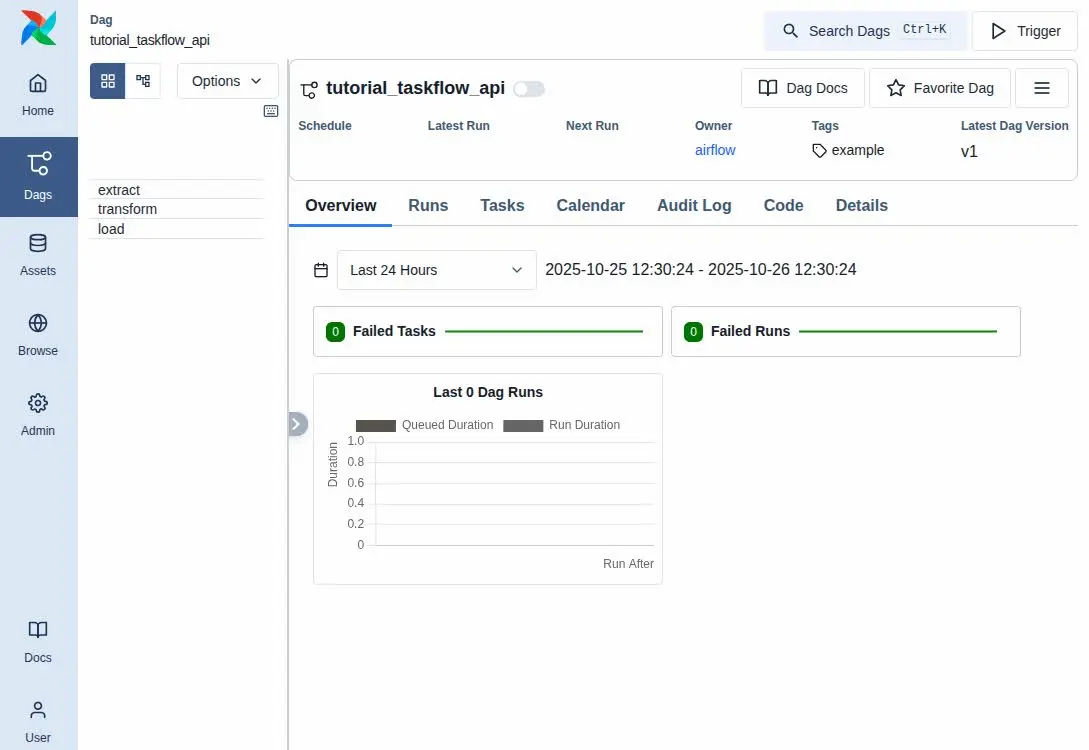
This defines three tasks—extract, transform, and load—and wires them together using function calls. The return value of one task is passed directly to the next, with Airflow handling inter-task communication under the hood using XComs.
Comparison to Pre-Airflow 2.0 DAGs
Prior to the Taskflow API, DAGs required manual task definitions using PythonOperator, explicit XCom handling, and manual setting of task dependencies. The Taskflow API removes much of this complexity by:
- Automatically generating task IDs from function names
- Handling XComs transparently
- Creating task dependencies through function invocation
Virtual Environment Support
As of Airflow 2.0.3, tasks can be executed in isolated virtual environments using the @task.virtualenv decorator. This allows developers to define custom Python dependencies or versions specific to a task:
@task.virtualenv(
use_dill=True,
system_site_packages=False,
requirements=['funcsigs'],
)
def extract():
data_string = '{"1001": 301.27, "1002": 433.21, "1003": 502.22}'
return json.loads(data_string)
This feature is useful for isolating dependencies or running Python code that isn't supported in the default Airflow environment.
Mixed Task Dependencies
The Taskflow API supports integration with traditional tasks such as BashOperator or FileSensor. You can define dependencies between decorated and traditional tasks using standard Airflow syntax:
file_task = FileSensor(task_id='check_file', filepath='/tmp/order_data.csv')
order_data = extract_from_file()
file_task >> order_data
This flexibility allows Taskflow-based DAGs to interoperate with existing Airflow components seamlessly.
Multiple Outputs
Tasks can return dictionaries as outputs. When the return type is annotated with Dict, Airflow infers multiple outputs automatically:
@task
def identity_dict(x: int, y: int) -> Dict[str, int]:
return {"x": x, "y": y}
Alternatively, set multiple_outputs=True in the @task() decorator explicitly if type hints are not used.
Best Practices for Using Apache Airflow API
1. Securing Endpoints with SSL
When using the Apache Airflow API, especially in production environments, it’s critical to secure communication between clients and the server. Enabling SSL (Secure Sockets Layer) ensures that data transmitted over the network is encrypted, protecting sensitive information from eavesdropping and tampering. SSL certificates can be configured on the web server hosting Airflow, ensuring that all API traffic is encrypted using HTTPS rather than HTTP.
To implement SSL, you need to configure the web server hosting Airflow to use an SSL certificate. This typically involves:
- Generating or obtaining an SSL certificate from a trusted certificate authority.
- Configuring the Airflow web server to listen on port 443 (HTTPS).
- Updating Airflow’s configuration files to specify the certificate and key paths for SSL.
By securing the API endpoints with SSL, you ensure that only authorized parties can interact with your Airflow API securely.
2. Implementing Request Retries
The Apache Airflow API may occasionally face temporary network issues or server unavailability that result in failed requests. In such cases, it is important to implement retries to ensure that operations are completed successfully. When calling Airflow’s API programmatically, you can use libraries such as requests or boto3 to implement retries with exponential backoff.
Here’s a simple approach to implement retries:
- Set the maximum number of retry attempts.
- Introduce a delay between retries, with an increasing delay after each failed attempt (exponential backoff).
- Handle specific HTTP error codes (like 500 or 502) that are commonly transient.
3. Documentation and Change Management
Maintaining up-to-date documentation is essential when using the Apache Airflow API, especially when managing and automating complex workflows. Documenting the API endpoints, their parameters, and expected responses makes it easier for developers to use the API correctly and troubleshoot issues.
Version control of both Airflow DAGs and API scripts is also essential. Keep track of changes to the Airflow API’s behavior, such as changes in request/response structures or deprecations, to ensure compatibility. Using tools like Swagger for interactive API documentation or writing inline code comments can enhance the understanding and usage of the API.
4. Testing Endpoints in CI/CD
Automated testing of the Apache Airflow API endpoints is crucial for validating the functionality of integrations and ensuring that any updates to workflows or system configurations don’t break the API functionality. Including tests in your CI/CD pipeline will ensure that API requests and responses are functioning as expected.
You can use frameworks like Postman or Pytest for API testing. For example, in Pytest, you can write tests to verify the behavior of API calls:
import requests
def test_get_dags():
url = "https://airflow.example.com/api/v2/dags"
response = requests.get(url)
assert response.status_code == 200
assert "dags" in response.json()
Automate these tests within your CI/CD pipeline to continuously monitor the integrity of the API and ensure that failures are caught early in the development process.
5. Ensure Compatibility Between Airflow Versions and API Clients
As Apache Airflow evolves, the API may undergo changes that affect how requests are handled or how endpoints function. It's essential to ensure that the API clients used in your organization are compatible with the version of Airflow you are running.
To avoid compatibility issues:
- Regularly check the Airflow release notes for any breaking changes or new API features.
- Use versioned endpoints (e.g.,
/api/v2/), as they help prevent issues when Airflow releases new versions of the API. - Test your client applications against staging or development environments running the same Airflow version to ensure compatibility before deployment.