
Training an LLM isn’t one job—it’s a sequence of carefully managed stages. This part shows how Dagster coordinates your training steps on RunPod so every experiment is reproducible, scalable, and GPU-efficient.
In the previous post, we focused on the earliest stages of the LLM pipeline. We gathered the FineWeb files, trained a high-performance tokenizer in Rust, validated it, and stored the resulting artifacts in S3. With that foundation in place, we can now begin modeling.
A major strength of nanochat is its portability. You can run it on a single machine, in the cloud, inside a container, or spread across multiple environments. Dagster preserves that flexibility while adding structure and visibility.
We already took the first step toward a more distributed workflow by uploading the tokenizer vocabulary to S3. The next step is to bring GPUs and external compute into the process, moving closer to how a production LLM pipeline operates. Before we can do that, we need to prepare the environment where the training jobs will run.
Preparing the Training Environment
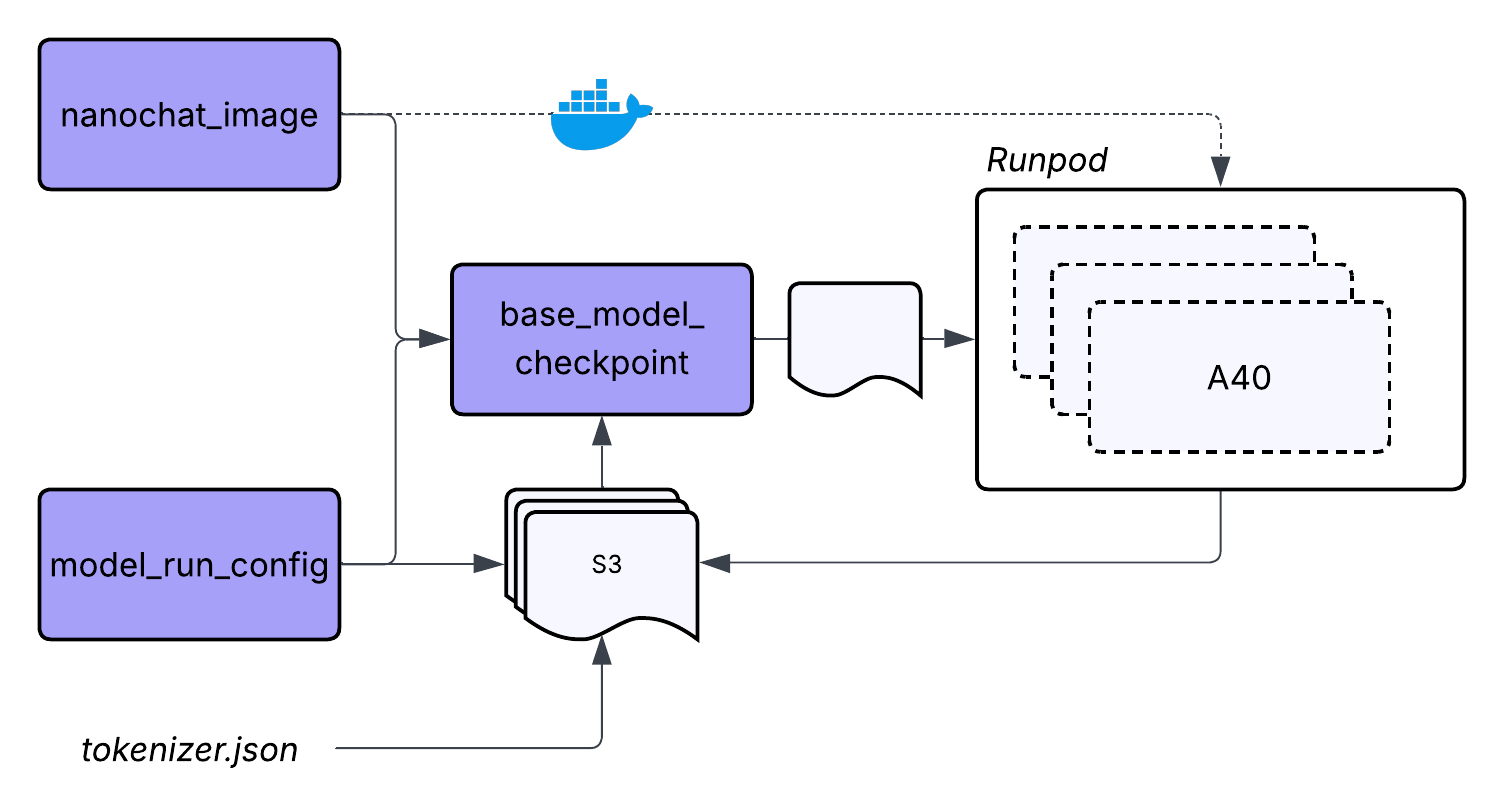
Regardless of where the training scripts will run, we first need to define what will run. That starts with packaging our code into an image that can execute consistently on any GPU node.
In this project, the nanochat_training_image asset represents that container. It includes the nanochat training code, the Rust tokenizer, and all required Python libraries. This does not mean we are limited to what is baked into the image. We still rely on S3 to pull in files produced by earlier steps and on other assets to coordinate the workflow.
There are many ways to build and publish images, but for this project the simplest approach is to build and push the image locally.
docker buildx build \
    --platform linux/amd64 \
    -f Dockerfile.training \
    -t {REPOSITORY LOCATION} \
    --push \
    .
Once the image is in a registry, any compatible GPU environment can load it and run the training scripts without additional setup.
Running Training on GPUs With RunPod
With the image prepared, we can begin training. For this project, we will use RunPod because it makes GPU compute simple to launch, scale, and tear down once training is finished. This matches our workflow goals: training should consume resources only while work is happening, and we should never need to log into machines manually or babysit jobs.
RunPod also lets us scale based on how much data we plan to train on and how large the model is. That flexibility aligns with the structure of the nanochat training pipeline, which proceeds in three stages.
Stage 1: Base Pretraining
Goal: Build general language understanding from raw text.
Data: FineWeb-Edu parquet files (up to 1,822 training shards, with shard_018222.parquet always reserved for validation).
Process:
- Train a GPT-style transformer from scratch.
- Uses the tokenizer produced in the previous post.
Stage 2: Midtraining
Goal: Introduce conversational structure and domain knowledge.
Data: A mix of conversational and reasoning datasets from Hugging Face, such as SmolTalk.
Process:
- Add special conversation tokens like <|user_start|> and <|assistant_end|>.
- Fine-tune on dialogue and reasoning datasets including SmolTalk, MMLU, GSM8K, and SpellingBee.
Stage 3: Supervised Fine-Tuning
Goal: Shape the model into a helpful conversational assistant.
Data: Similar to midtraining, with additional reasoning challenges such as ARC.
Process:
- Fine-tune on curated instruction-following and conversation data.
- Encourage clear, polite, and helpful responses.
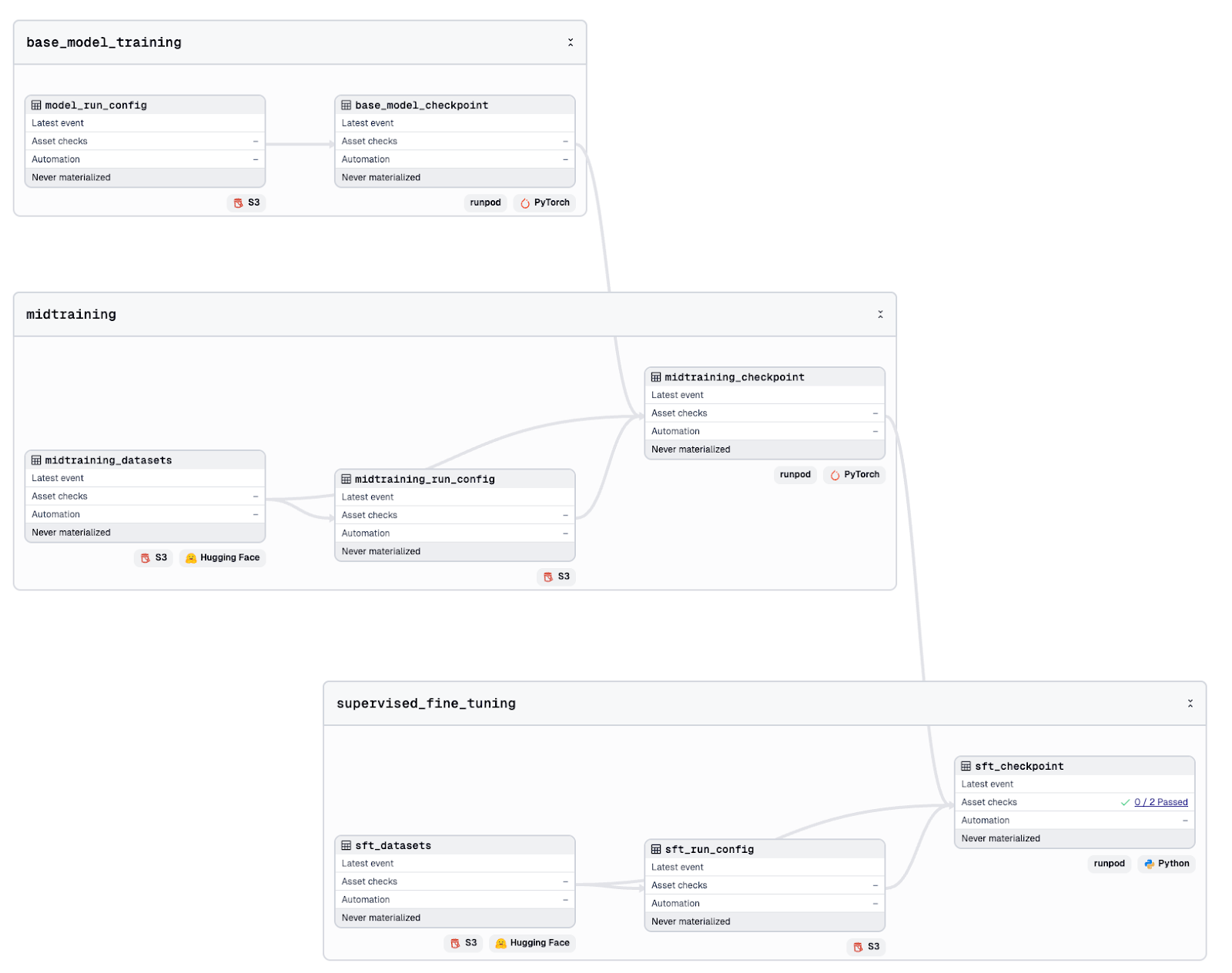
The purpose here is not to redesign nanochat. Instead, we express each of its training steps as its own Dagster asset. This gives us lineage, versioning, clear placement within the pipeline, and tighter tracking of the datasets each step depends on.
| nanochat | dagster-nanochat |
|---|---|
| scripts/base_train.py | base_model_checkpoint |
| scripts/mid_train.py | midtraining_checkpoint |
| scripts/chat_sft.py | sft_checkpoint |
Creating a Custom Resource for GPU Training
To run pods through the RunPod API, we need a central place to store the connection and execution logic. A Dagster resource is a perfect fit for this. It defines how pods are created, monitored, and terminated, and the same logic can be shared across all training assets.
class RunPodResource(dg.ConfigurableResource):
    api_key: str
    gpu_type_id: str = "NVIDIA A40"
    gpu_count: int = 2
    cloud_type: str = "SECURE"
    env_variables: dict[str, str] = {}

    def run_pod(
        self,
        pod_name: str,
        image_name: str,
        command: str,
        context: dg.AssetExecutionContext,
    ) -> dict[str, Any]: ...

    def get_pod(self, pod_id: str) -> dict[str, Any]: ...

    def terminate_pod((
        self,
        pod_id: str,
        context: dg.AssetExecutionContext,
    ) -> None: ...
Each training asset depends on this resource, along with the Docker image asset and the run configuration stored in S3. When an asset runs, it creates a GPU pod with the training environment, executes the script, waits for the checkpoints to appear in S3, and then shuts the pod down.
The result is a clean, predictable training pipeline that uses compute only when needed. It is simple to follow, easy to debug, and straightforward to scale.
You will need a RunPod API key to execute these assets. However, the entire pipeline can still run locally in a special quick mode. This mode uses small datasets and tiny models, allowing the full workflow to run in minutes and at very low cost. The resulting model is not strong, but it demonstrates the complete flow from start to finish.
Watching the GPUs Work
One advantage of using external GPU pods is that you can view their resource usage in real time. As the Dagster asset runs, the RunPod UI shows how the GPUs are being utilized. You can see whether the load is balanced, whether memory is saturated, and whether additional workers would help. This level of visibility is valuable for tuning training performance.
It also creates a tight feedback loop between pipeline design and actual hardware behavior. If you adjust batch sizes, sequence lengths, dataset sizes, or model depth, you can immediately observe the impact on GPU utilization. This makes it much easier to iterate intelligently. Instead of guessing about bottlenecks or relying on logs after a job finishes, you get direct insight into how well the training workload matches the available compute.

Validating the Trained Model
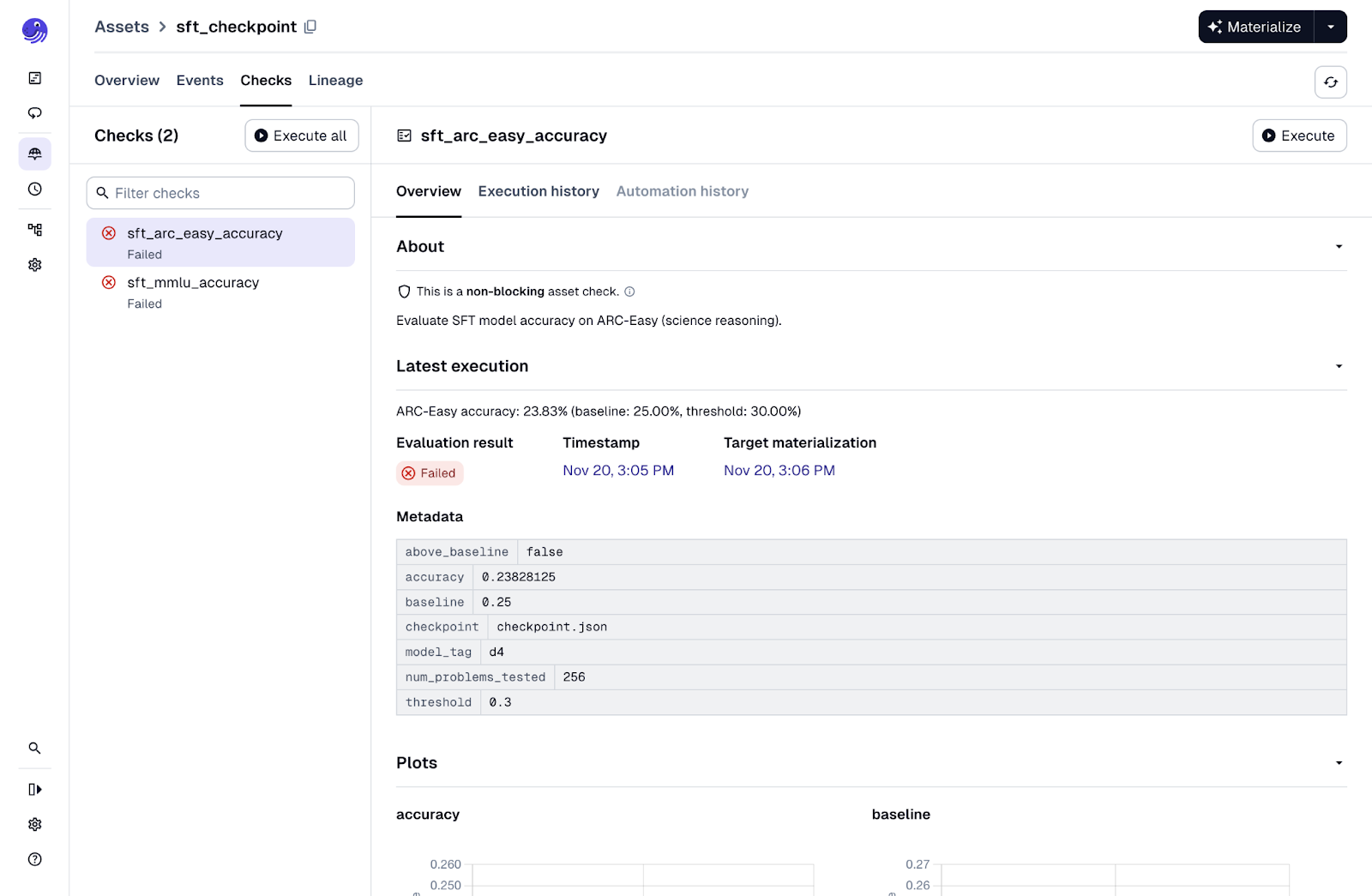
Our final step gives us an opportunity to evaluate the model. After supervised fine-tuning, we can attach asset checks that test the model on academic-style benchmarks. These checks come directly from the original nanochat repo, but Dagster makes them easier to see and interpret.
Both asset checks load the model and proceed to test the model in different circumstances. The sft_mmlu_accuracy check asks 57 multiple-choice questions across subjects like history, medicine, math, and law. A random baseline is 28 percent. The check reports whether the model meaningfully exceeds that. The sft_arc_easy_accuracy check evaluates grade-school science questions from the AI2 ARC dataset. The random baseline is 25 percent. A score above 35 percent suggests the model is starting to generalize.
If you run the pipeline with minimal GPU investment, these checks will likely fail because the model is intentionally tiny. This can still be fine to ensure we can run our pipeline end to end so we can leave these checks as non-blocking. This way we can continue on with the pipeline for further experimentation.
Coming Next: Model Deployment
At this point we have all the components needed to try the model in practice. We have a trained and validated set of checkpoints, stored in S3 and ready to load. What we do not have yet is a way to serve the model. As proved with our asset checks, this is something we can do locally but we will want something closer to a production environment.
In the next post, we will look at how to deploy the model using the serverless side of RunPod. This will complete the journey from ingestion to training to deployment, forming a fully orchestrated LLM pipeline from end to end.